Muat turun APK Selamat & Cepat di APKPure
APKPure menggunakan pengesahan tandatangan untuk memastikan muat turun APK Hands free speech sms/texting tanpa virus untuk anda.

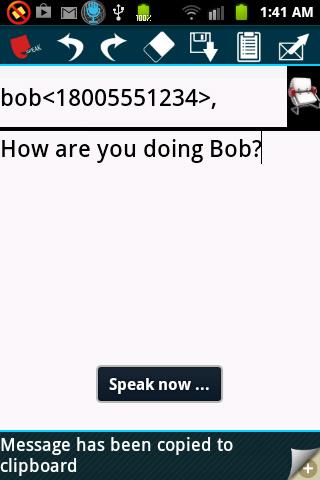
Touch to open gSpeechSMS, compose and send just by speaking.
Hands free speech SMS or texting (gSpeechSMS):
Open. Speak. Send.
This app provides a convenient and hands free way to compose and send Text message or SMS just by speaking. This app is designed to provide easy texting or SMS in one click.
★ Find your contact and compose your SMS just by talking.
★ Edit buttons for quick compose of longer messages.
★ Easily search your contacts by entering partial info.
★ Automatically saves your message when you exit.
★★★ Speak a complete sentence with punctuations while you see “Speak now…” message. ★★★
★★★ Automatic contact selection if you say any unique part of your contact name or number. ★★★
★ ‘New line’ voice command: “new line new line”.
★ ‘Undo’ voice command: “undo undo”.
★ ‘Redo’ voice command: “redo redo”.
★ ‘Clean’ voice command: “clean clean”.
★ ‘Save’ voice command: “save save”.
★ ‘Send’ voice command: “send send”.
★ ‘Clip’ voice command: “clip clip”.
★ Stop recording voice command: “stop stop”.
gSpeechSMS is powered by Google speech recognition technology (US English).
***********************************************************************************************
This Speech SMS app works differently from other voice recognition apps. We highly recommend you read the “How to …” sections before you try it.
The Speech SMS experience is best using a 3G or higher/WiFi internet connection.
***********************************************************************************************
How to use “Hands free speech SMS or texting (gSpeechSMS)”:
Speech recognition is ON and continues when you are in the app. You may Stop/Start recording by clicking on the record button, on the top left corner of the screen.
• Speak a complete sentence with punctuations when you see “Speak now…” message. Note that you must complete voicing out your message during the time the “Speak now” message is visible, after which the device stops listening and proceeds towards deciphering the sentence. You may start with your next sentence as soon as the message reappears. You must give the device some time, while it is recognizing your speech. Start the next sentence once the “Speak now” message box appears again. Simply repeat these steps one after the other and complete your speech.
• Undo (voice recognition command: “undo undo”): If you want to rollback your text (not contact number), simply press undo button.
• Redo (voice recognition command: “redo redo”): If you want to bring back your undone text (not contact number), press redo button.
• Clean (voice recognition command: “clean clean”): Quick erase and start over. If you accidentally erase, just press undo button.
• Save (voice recognition command: “save save”): Saves the message as it is for you to comeback and finish later. Automatically saves draft when you pause/exit.
• Send (voice recognition command: “send send”): Send when you are done, after which the SMS is automatically sent.
• Contacts: Find and add contacts separated by “,”.Browse all your contacts by pressing contacts button.
If your specified contact information matches multiple entries in your contact, touch the message area and select the desired contact.
• Say “stop stop” to stop recording.
These are all the utile hands free shortcuts to ensure an expedient texting experience. The hands free SMS and Texting experience is best using a 3G or higher/WiFi internet connection.
Please let us know if you need any improvements. Enjoy!
Your feedback is very important for us. Please leave a comment and/or suggestion in Google Play.





Satu klik untuk memasang fail XAPK/APK pada Android!

Terima kasih atas penilaian dan maklum balas anda!
Anda sudah dinilai.