Descargas seguras y rápidas de APK en APKPure
APKPure utiliza verificación de firmas para garantizar descargas de Face Maker APK libres de virus para ti.

Disfruta de millones de revistas, libros, películas, canciones, juegos y aplicaciones de Android recientes y mucho más estés donde estés y en cualquier dispositivo.
Let's play to Face Maker.
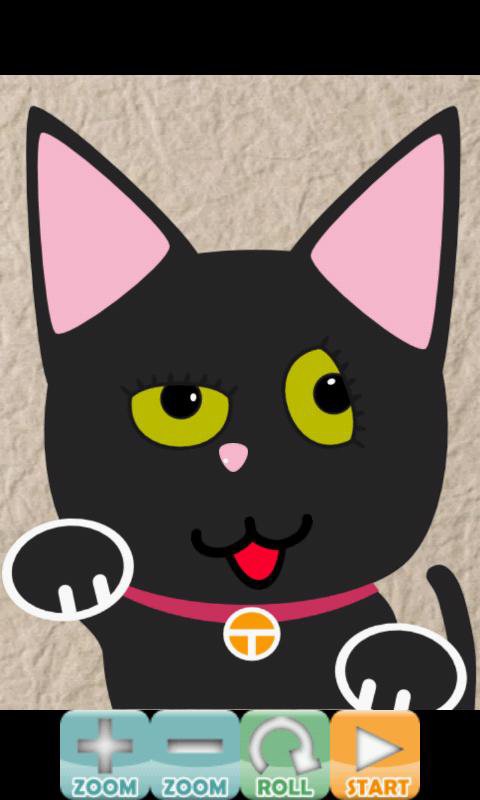
First of all, push "START" button and select the kind of Face.
If you push the "NEXT" button, a screen will become worse, and it will be screened by you.
Since a parts of Face is displayed at random, please move by sliding a screen.
Let's keep in mind that parts rotate while touching the screen.
If you push the "ROLL" button, you can change the hand of cut of parts.
If you push the "ZOOM" button or Mutil-touch screen, you can change size of parts.
Although parts appear in standard size by default, parts appear in a random size if you select 'Random size' from Menu.
Let's push the "NEXT" button, if a position, an angle, a size, etc. are decided.
If parts are placed similarly and it becomes the last parts, a button will change to "FINISH".
When the "FINISH" button is pushed, a bandage can be taken and a face and the placed parts all come to appear.
By choosing "Save image" from Menu, the made strange face can also be saved as a picture file.
- It operates since Android1.6.
- It is a confirmed operation by N-04C,SH-12C.


¡Un clic para instalar archivos XAPK/APK en Android!

¡Gracias por tu valoración y comentarios!
YYa has valorado.