Téléchargements APK sûrs et rapides sur APKPure
APKPure utilise la vérification de la signature pour garantir des téléchargements de SmartMouse APK sans virus pour vous.

Enjoy millions of the latest Android apps, games, music, movies, TV, books, magazines & more. Anytime, anywhere, across your devices.
SmartMouse turns your mobile to a wireless mouse, a multi-touch magic pad, a flash drive, a remote Desktop client, a presentation pen, a file transfer station and many more, a true multifunctional PC remote control.
Step 1: Install SmartMouse app on your mobile.
Step 2: Install SmartMouse Windows server on your PC;
(To download: www.smartmouse.cn)
Step 3: Sit back, relax and enjoy the freedom brought to you by SmartMouse
Feedback (All comments are welcome):[email protected]
Introducing the revolutionary SmartMouse, a new way to control and interact with your PCs.
No matter what you want to do: to impress your clients during presentations, to watch films or listen musics from a PC while lying in a sofa, or to browse the internet while sitting back in chair, with the help from SmartMouse, you can managethem all by simple natural finger gestures on your mobile. SmartMouse liberate you from yourdesktop. MS office, media player, IM, VoIP, video chat, photo viewer, etc., all within the control from your remote your finger tips. What's even better, it is completely FREE!
SmartMouse consists of two parts: a server part needs to be installed on your PC and a client app on your mobile. SmartMouse server is FREE to download from the official website:http://en.smartmouse.cn.
SmartMouse uses wireless technology, saving the hassle to deal with annoying cables. Set up a connection is effortless,while both the SmartMouseserver and mobile app are running, mobile can automatically detect available PCs, with a few clicks, you can access and control your PC easily using WiFi, MiFi or Bluetooth connections.
SmartMouse supports multi-point finger gestures. A full set of gestures let your fingers do the clicking, scrolling, swiping and pinching on screen of a smart phone. Also, SmartMouse supports live screen capture of computer, let you take control of your computer outside your view.
SmartMouse doesn't stop there, it also works as a File Transfer Station. Files and data between mobile and PC can be easily shared and transferred. SmartMouse can also be served as a Task Manager, it has many shortcut functions for computer, such as shutdown PC, show Desktop,mute / unmute ...
Features:
1. Smart recognition of PC programs, natural handy gestures for presentations(.PPT ), internet browsing (IE, Chrome, Firefox) and video/music playing (YouTube, media players...).
2. Wireless file transfer between mobile and PC, get rid of the need for a USB data cable.
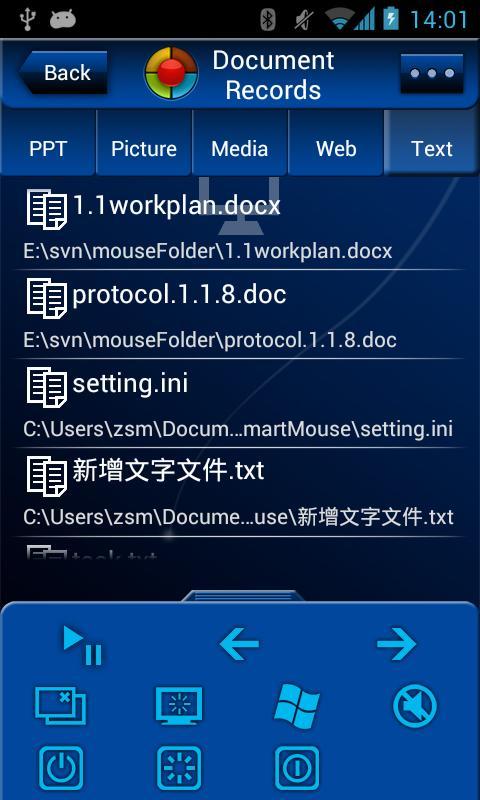
3. View and access recent docs, files, musics, videos and browsing records in PC.
4. Password and Privacy settings, provide you with peace of mind.
Highlights :
View live screen capture and PPT notes while facing audience, better than expensive presentation pens.
Share one computer screen with multiple mobile users and control multiple PCs using one handset.
Support multi-touch finger gestures on mobile screen: tap to click or double click; two-fingerswipe to scroll; pinch to zoom; two-finger tap for right click, double tap and hold to move window or scroll bar and to select files and text.
Some examples:
★Finger gestures during presentation(.ppt)
Swipe right to previous page;
Swipe left to next page;
Swipe up to first page;
Swipe down to last page.
★Figure gestures For internet browsing
Two-finger slide up/down to scroll up and down
Two-finger slide left/right to back and forward
Double tap and hold to move window or scroll bar and to select.
Volume buttons to page up/down
Open / close two fingers on mobile screen to zoom in /out the display on PC.
★Image / Picture show
Slide finger left and right to change images
Open two fingers on mobile screen to blow up images.
Close two fingers to zoom out images.
★Also
Mobile phone's volume buttons are used as volume control for PC during music and video playing.
SmartMouse support one-to-many connections, control multiple PCs with one handset, share one computer with multiple mobiles.
v1.5
1. Add keyboard input, send text to PC.
2. New skin and UI.
3. Add smart function keys in Mouse mode.
4. Smart recognition for more PC programs ( Acdsee, Winamp, qq video etc.)



Un clic pour installer les fichiers XAPK/APK sur Android!

Merci pour votre note et vos commentaires!
Vous avez déjà évalué.