
APKPure で安全で高速な APK のダウンロード
APKPure は署名検証を使用して、ウイルスフリーの instMail APK ダウンロードを保証します。

いつでもどこでも、お使いの端末で何百万もの最新の Android アプリ、ゲーム、音楽、映画、テレビ番組、書籍、雑誌などをお楽しみください。
InstMail let's you send pre-written messages in one touch!
Do you send the same message to the same person every day? Do you want
your children to tell you that they are OK with just one click?
3 Easy Steps:
1. Write a message. (e.g. "I'm on my way")
2. Set the recipient. This can be Email, SMS, or both!
3. Touch the message to send it automatically.
Imagine you are a parent and are on your way to pick your child from
school. You want your child to message you when they have left the
school. Maybe it is too difficult to instruct your child on how to
type and send a message. However, with InstMail, they can easily send
you that message with one touch.
Imagine you are carpooling and you have to pick someone up every day.
Do you write them every day to let them know when you are outside
their home? Why not create such a message with InstMail and send it
every day with just one touch!
There are many situations in life where we send the same message to
the same person many times. For these situations, use InstMail.
InstMail saves you time and hassle. InstMail saves you money because it's FREE.
Usage instruction:
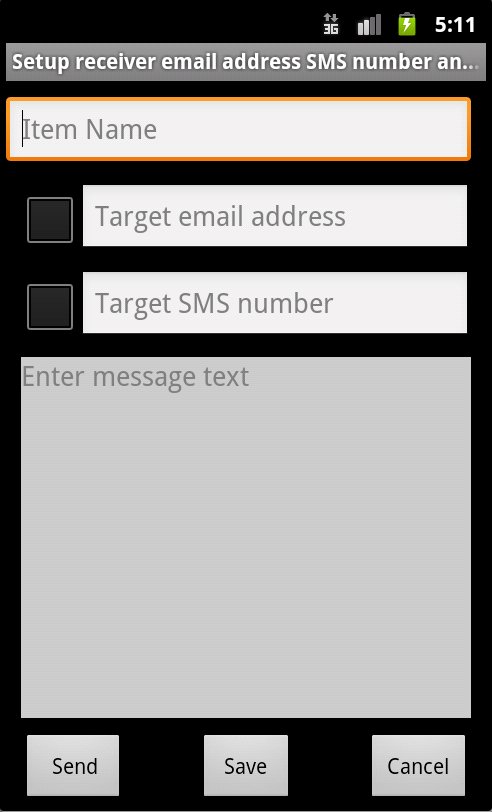
1. Press Add Item to create a single touch sending button
2. Provide the button name
3. Set "V" and provide message destination Email address (if you are planning to send email).
4. Set "V' and provide message destination phone number (if you are planning to send SMS).
5. Type a message. Take care that SMS couldn't exceed 160 characters. There are no any size limitation if email only is selected.
6. Press save.
You got a new button before Add Item with the name you provided at the step 1.
There is no limitation on the created buttons amount.
Long press on an item sends message.
Short press allows to edit the button. You may change email address, phone number and message text.
Pressing send allows to send without saving.
NOTE:
For email sending the application requires a gmail account credentials.
Hint: Register a new gmail account.
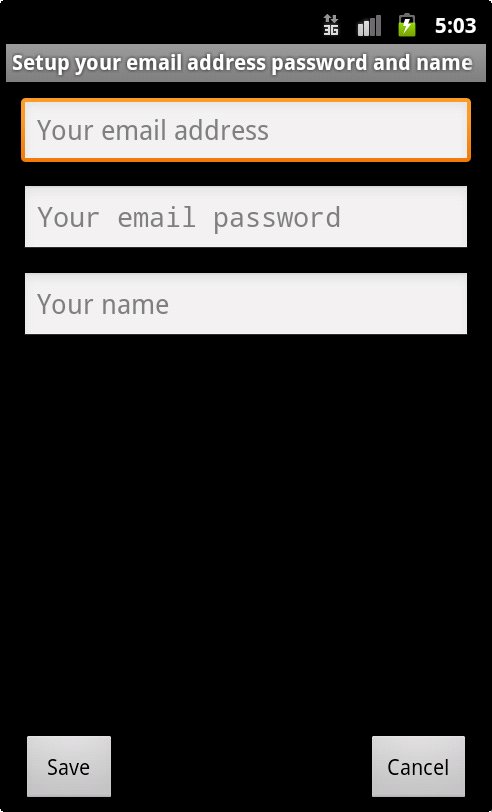
The Options button allows to add your name and your email address and password that are mandatory for email sending. If you do not plan sending email then you shouldn't fill these fields.
NEW FEATURE!!!
Added GPS location stamp to the message tail. In Options dialog enable GPS. Enabling GPS and netvork location service are mandatory for GPS option operation:
Telephone Settings: Settings->Location->Mode->High accuracy is to be selected.
Version 7 -- 1.3.3 Added delete button. Setup a numeric keyboard for phone number typing as a default.
Version 8 -- 1.3.4 Added delete dialog. Move focus between fields if key is pressed.
Version 9 -- 1.4.0 Added location stamp to message.
Version 10 -- 1.4.1 Enhanced location stamp to message.



あなたの評価とフィードバックをありがとう!
すでに評価しました。