






Wuthering Waves 3.7 "Prism's Illusion, Heart's Illumination" is the last major Mengzhou patch before the story swings into a new arc, and beta testers have already spilled most of its contents. The new version is expected to drop around October 1, 2026, right after Version 3.6 wraps up on September 30. It headlines two new 5-star characters, Hsin and Suoming, both Electro units, plus three new Echo sets and a handful of quality-of-life fixes. If you want the Wuthering Waves latest version news without digging through datamine forums, this rundown covers the whole Wuthering Waves update so far.
Wuthering Waves 3.7 Release Date and Preview Broadcast
Nothing here is final until Kuro Games runs its official preview stream. The broadcast is estimated for mid to late September 2026. Closed beta text already fills in kits, weapons, Echo sets, and events, and a short test-build combat video went out around September 2. All combat numbers and banner reruns can still shift before launch, so treat everything below as a strong sketch rather than a contract.
The bigger point is the arc change. Version 3.7 closes out the Mengzhou storyline, which means whatever arrives in Version 3.8 and beyond will move the world somewhere new. For players who've been with Wuthering Waves since 1.0, this is the patch that ties off a chapter.
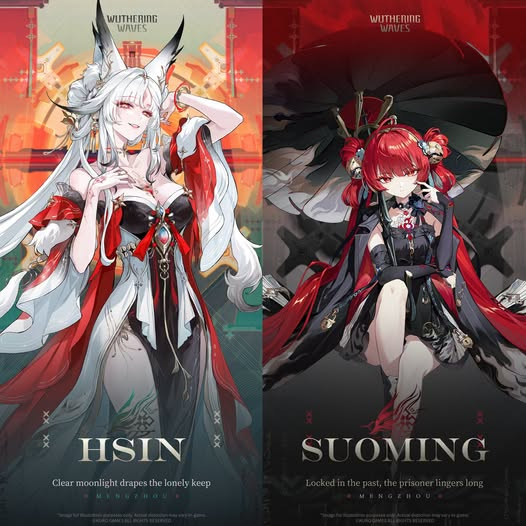
Wuthering Waves New Character: Hsin (Moon Fox Sentinel)
Hsin is the update's headline pull, and she's notable for one big reason. She's the first playable Sentinel in the game. Her official title is the Moon Fox Sentinel of Mengzhou, and her power is called Fractal Proliferation.
Leaked kit details point to an Electro Rectifier main DPS with two combat phases and two Resonance Modes. In her default Response Phase, she uses Profound Mechanism attacks and builds Response Heart up to 100. Hitting that cap unlocks "Treading the Mortal World," a heavy attack that deals Resonance Skill damage and grants a short burst of damage plus interruption immunity. Out of combat, she can become a Heart Fox, a form that restores 2% of her max HP every second and stops enemies from detecting her.
After her Liberation, she flips into Illumination Phase. Here she summons the Myriad Phases Divine Palace, gains a new moveset, and can walk on water or drift through the air while burning Stamina. She builds Illumination Heart to 300, which unlocks "Myriad Barriers Linked in Balance" and triggers Omnipotent Command for 13 seconds, buffing her Basic Attacks and Dodge Counter.
Her two Liberations are where the kit gets complex. "Pillars Across Heaven" moves her into Illumination Phase and grants 21 Decree stacks, which summon Flying Ramparts that fire coordinated Electro attacks whenever teammates deal damage. "Myriad Blazing Hanging Heaven" sends her back to Response Phase and ends the enhanced state. She also carries two Resonance Modes, Unison and Electro Flare, that change how her Outro buffs the team.
Wuthering Waves New Character: Suoming (Electro Sword)
Suoming is the phase 2 newcomer. She's from Huating, the founder and Seal Master of the Ten Seals Covenant, and her power, Frequency-Locking, lets her borrow a target's Forte at reduced strength with a cap of ten anchored frequencies.
The current consensus reads her as an Electro Sword hybrid who plays as a flexible Main or Sub DPS. Early leaks tagged her as a Havoc Rectifier, but that label is outdated. Test footage shows her swinging an umbrella blade with chain attacks to charge Concerto, then swapping into Hsin. Her basic string is three Electro hits, with Canopy Basics replacing it after state changes and going up to four hits. Her Resonance Skill, Closed Umbrella Form or Breach Gap, can counter an incoming hit, nullify that damage, immobilize nearby enemies, and grant interruption immunity before triggering Crimson Flash.
Her team support is the real story. Current beta text stacks Electro damage bonuses across several passives and adds Unison support plus coordinated lightning attacks. Her personal Crit DMG can climb as high as 80% in the current text. Her Outro, Canopy Rumble, hands the incoming Resonator 20% Electro damage amplification, and if that ally has Unison Boon, they also gain 25% Resonance Skill damage for 8 seconds. That's why she and Hsin look designed as one rotation.
Wuthering Waves 3.7 Banners and Reruns
Here's how the two phases break down according to the leaked Wuthering Waves 3.7 banners list.
| Phase | New 5-Star | Rerun 5-Stars | 4-Stars |
|---|---|---|---|
| First half | Hsin | Chisa, Iuno | Buling, Taoqi, Youhu |
| Second half | Suoming | Lynae, Lucilla | Lumi, Danjin, Yangyang |
Hsin runs first, so if you pull on day one, you'll be waiting on Suoming until phase 2. The rerun lineup matters too. Chisa and Iuno show up with Hsin, while Lynae and Lucilla run alongside Suoming. Plan your Astrites around which 4-star copies you still need, since Buling, Taoqi, and Youhu are all staples in their respective teams.
Wuthering Waves 3.7 Weapons and Echo Sets
Both signature weapons are shown at level 90 with 587 ATK and 24.3% Crit Rate, but their official English names aren't locked yet. Hsin's signature is a Rectifier, and Suoming's is a Sword. The client shots still carry Chinese names, so placeholders like Crit Rate Rectifiers and Crit Rate Swords are the safe bets until the English versions drop.
Three new Sonata Echo sets are circulating in the recap. Heart of Sworn Vigil is tagged as Hsin's set, granting 10% Electro damage for two pieces and a Crit Rate plus Electro damage boost when you trigger Electro Flare or Unison. Flash of Electric Reflection looks like the swap or support Electro set, and Flower of Tinged Yearning is a healer set with Unison synergy. There's also a new unnamed Cost 4 Calamity Class Echo carrying Hsin's silhouette. If you're farming ahead of the patch, Electro pieces are the clear direction.
Wuthering Waves 3.7 Events and Quality-of-Life Changes
On the content side, the recap lists a Cubie Wars event, also translated as Brawl Between Saealsim Warriors, plus a Pioneer Test Event. No new open-world map appears in the current recap, which fits the closing-the-Mengzhou-arc theme.
The quality-of-life tweaks are the kind most players actually care about. There's a partial Story Replay, a 3D Party Menu toggle, and inventory stacking for identical Echoes that share the same set and main stat. That last one alone will save a lot of backpack scrolling for endgame farmers.
Should You Save for the Wuthering Waves 3.7 Update?
If you're weighing whether to skip the tail end of 3.6, Hsin is the bigger question mark. She's a complex, high-execution carry whose value depends on how much of her numbers survive beta trimming. Suoming reads as the safer long-term pick because her kit is built around amplifying whoever follows her, and supports tend to age better than new DPS units.
As a pair, they're clearly meant to run together with Electro Rover as the free third slot. If you already own a strong Electro core, this is a patch to watch closely. If your Astrites are low, holding for the official stream and the final numbers is the smarter move than locking a pull order now.
Once Wuthering Waves 3.7 goes live, you can grab the updated client from APKPure. The APK usually lands within hours of the official rollout, so it's the fastest way back in on Android. For your safety, download Wuthering Waves APK from APKPure rather than random mirrors, and always check app permissions before installing to keep your account and device data secure.

Versie 3.6 "Lamplicht in een illusie, de vastberadenheid van het zwaard in het hart" is nu beschikbaar!
- How to Download VSCO: Photo Editor APK Latest Version 495 for Android 2026
- TrueID: ดูทีวี ซีรีส์ หนัง'i telefonuma nasıl indirebilirim?
- Как скачать последнюю версию JoyMi - Grup Sesli Sohbet APK V3.38.2 для Android 2026