
ดาวน์โหลด APK ได้อย่างปลอดภัยและรวดเร็วบน APKPure
APKPure ใช้การตรวจสอบลายเซ็นเพื่อประกันการดาวน์โหลด APK ของ Bluetooth Toggler ที่ปลอดไวรัสสำหรับคุณ

Toggle your bluetooth quickly with Bluetooth Toggler
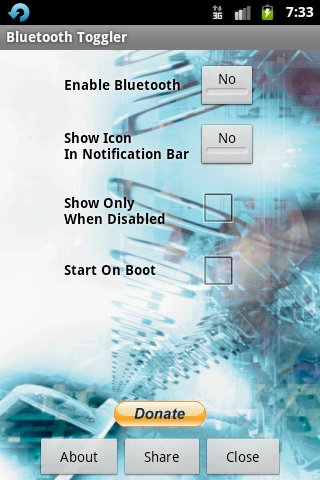
Bluetooth toggler is basically a replacement tool for the default search button on your android phone when you long press it. It allows you to quickly toggle your bluetooth from ON to OFF and vice versa.
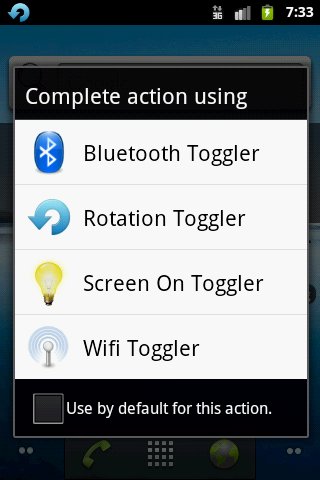
Once installed, press and hold the search button on your android phone and a dialog will appear. Then select bluetooth toggler to toggle between your bluetooth states of ON and OFF. You may also set it as the default action when you long press your search button, but it is recommended NOT to set as the default action, so that you may use it in conjunction with other search button replacement tools such as Screen On Toggler (also by me).
You may clear the default setting for Bluetooth Toggler by going to the Manage Applications area, select Bluetooth toggler and scroll down and click on the "Clear Defaults" button. This should restore the selection dialog when you long press the search button.
To disable your bluetooth connection, you may either touch on the bluetooth toggler icon on your android's notification bar OR you can long press your search button and select the bluetooth toggler again, to toggle it. It's that simple.
Recent changes:
- Fixed some small bugs with getting bluetooth adapter

คลิกเพียงครั้งเดียวเพื่อติดตั้งไฟล์ XAPK/APK บน Android!

ขอบคุณสำหรับการให้คะแนนและข้อเสนอแนะของคุณ!
คุณได้ให้คะแนนแล้ว