Tải APK an toàn và nhanh chóng trên APKPure
APKPure sử dụng xác minh chữ ký để đảm bảo tải APK miễn phí virus cho AnalogClock Widget TalkingLite.

CS Dev
Analog Clock Widget Talking Lite
This widget is the lite version of our free Analog Clock Widget Talking Pro. It has the feature of saying the time, along with the cuckoo effect. Our Lite version allows you to preview the feature only i.e. just testing how it sounds. The Pro version has the feature of saying the time at regular intervals plus on tapping the widget also.
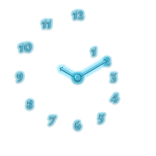
The application comes with 5 neon solid color designs. Additional themes can also be downloaded. See in the "More From This Developer" section.
Minimum widget size is 2x2 and is re-sizable.
Support for saying the time in other languages. This clock uses the TTS engine installed on your phone. ENSURE YOU HAVE TTS ENGINE INSTALLED ON YOUR PHONE.
You can customize your TTS engine settings. Thus you can modify it to say in different languages as well modify the speed. To do so, please enter your Phone Settings and see the Languages & Input settings. There you will find your TTS Settings.
Drop us a mail, in case the app is not working for you.
Analog clock gives a very distinct personal feel, which digital clocks just do not give. We therefore look forward to develop additional designs which are usually not present in other analog clock widget applications.
Our users may also come forward and suggest designs which they have in their minds. Do drop us an email to let us know. We will surely attempt to make one.
Kindly do rate our app well and in case of any problems drop us an email.
THIS IS A WIDGET APP. IT NEEDS TO BE ADDED ON YOUR HOME SCREEN. IT WOULD NOT BE SEEN IN YOUR APP DRAWER.
STEPS TO ADD THE WIDGET:
1) LONG PRESS ON AN EMPTY REGION OF YOUR HOME SCREEN.
2) WAIT FOR THE MENU TO POPUP
3) SELECT TO ADD WIDGET
4) THIS WOULD LOAD ALL THE WIDGETS INSTALLED ON YOUR PHONE. (SEE THE SCREENSHOT)
5) SELECT OUR APP (SEE THE APP ICON)
Note:
The Full Internet Access & Network State permission is required as the widget displays advertisements only when the widget is being configures.
Advertisements are not displayed once the widget has been placed on the screen.
Bug Fixes
-0.6
Option to say the time on tapping the widget (PRO Version ONLY), option to mention which hours of the day can be taken as Morning, Afternoon, Evening & Night. We thank Peter Brodie & Benjy Copeland for suggesting to add these features.
Using different TTS engines, one can customize the time to be said in ones own language. Enter your phone settings within which see 'Languages and Input'.
Two prefix options given, 'Time is' & 'It is'. Plus toast notifications on time.



Một cú nhấp chuột để cài đặt các tệp XAPK/APK trên Android!

Cảm ơn bạn đã xếp hạng và phản hồi của bạn!
Bạn đã đánh giá.