Tên gói:com.goodmooddroid.gestures
Xem thêm

GMD Gestures đã trở lại - cử chỉ đa chạm mọi lúc mọi nơi. Yêu cầu quyền truy cập Shizuku.
GMD Gestures đã trở lại - cử chỉ đa chạm mọi lúc mọi nơi. Không cần root. Chỉ cần quyền truy cập Shizuku.
Bạn đang tìm kiếm các cử chỉ đa chạm kiểu One UI 9 trên điện thoại Android của mình? GMD Gestures cho phép bạn tùy chỉnh các thao tác vuốt, chụm và xoay nhiều ngón tay trên các ứng dụng, không chỉ trên màn hình chính.
Sau 10 năm, GMD Gestures mang khả năng điều khiển cử chỉ đa chạm mạnh mẽ của GMD GestureControl gốc đến với Android hiện đại.
Đây không chỉ là một ứng dụng cử chỉ cạnh màn hình thông thường.
GMD Gestures cho phép bạn tạo các cử chỉ đa chạm tùy chỉnh mạnh mẽ hoạt động ở bất cứ đâu trên màn hình của bạn — trên các ứng dụng và trên màn hình chính.
CỬ CHỈ ĐA CHẠM
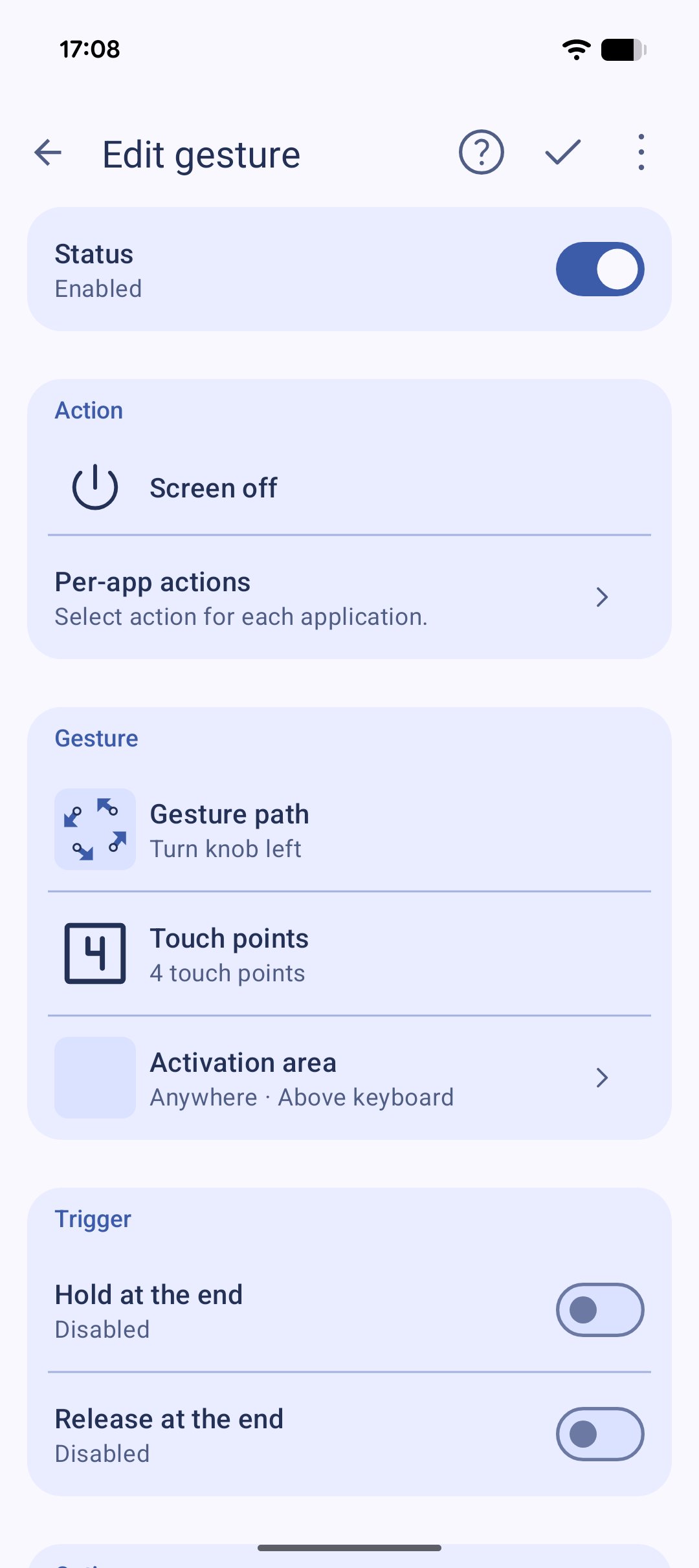
Tạo cử chỉ bằng 1, 2, 3, 4 hoặc 5 ngón tay.
Chụm, kéo giãn, xoay, vuốt hoặc vẽ các hình dạng của riêng bạn bằng nhiều ngón tay. Gán các hành động khác nhau cho các cử chỉ khác nhau.
KHÔNG CẦN LỚP PHỦ
GMD Gestures không yêu cầu lớp phủ nào nằm trên các ứng dụng của bạn để phát hiện cử chỉ. Nó không làm cản trở các thao tác nhấp chuột hoặc cuộn trang của bạn.
Màn hình của bạn vẫn không bị che khuất và các ứng dụng vẫn hoạt động đầy đủ.
CỬ CHỈ Ở MỌI NƠI
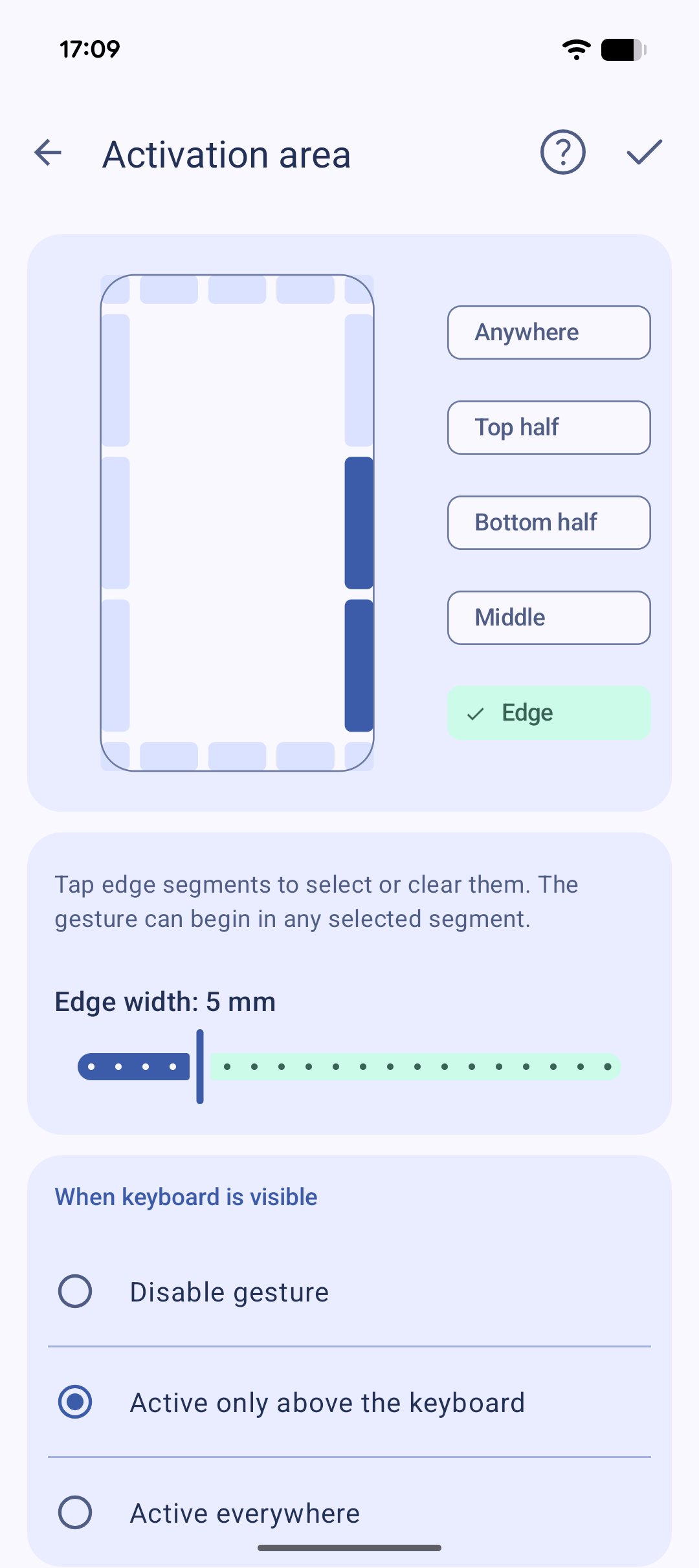
Bạn không cần phải bắt đầu cử chỉ từ một cạnh hẹp hoặc khu vực kích hoạt chuyên dụng.
Bắt đầu một cử chỉ ở bất kỳ đâu trên màn hình.
Bạn thích các vùng kích hoạt chuyên dụng hơn? Bạn cũng có thể tạo ra chúng — mà không làm cản trở các thao tác chạm hoặc cuộn thông thường trong khu vực đó.
CÁC HÀNH ĐỘNG TÙY CHỈNH MẠNH MẼ
Mở bảng Launchpad tích hợp bằng cử chỉ từ bất kỳ ứng dụng nào. Tùy chỉnh nó với các ứng dụng gần đây, ứng dụng yêu thích và các hành động.
Sử dụng cử chỉ để:
• Chọn từ các thao tác tích hợp sẵn để chuyển đổi ứng dụng, điều khiển cài đặt, tab trình duyệt và phương tiện, chụp ảnh màn hình, bật/tắt đèn pin, và nhiều hơn nữa
• Khởi chạy hoặc đóng ứng dụng
• Thực hiện các phím tắt
• Chạy các tác vụ Tasker
• Thêm cử chỉ của riêng bạn vào điều hướng Android
• Kích hoạt các hành động bằng cử chỉ vẽ tùy chỉnh
Vuốt bằng nhiều ngón tay, vẽ một hình dạng, hoặc thậm chí vẽ một tên lửa nếu đó là cử chỉ bạn muốn. 🚀
HOẠT ĐỘNG Ở MỌI NƠI
Cử chỉ hoạt động trên tất cả các ứng dụng và màn hình chính, cho phép bạn truy cập nhanh vào các hành động yêu thích mà không cần thêm nút hoặc điều khiển vào màn hình.
ĐƯỢC XÂY DỰNG CHO ANDROID HIỆN ĐẠI VỚI GIAO DIỆN NGƯỜI DÙNG MATERIAL 3
GMD Gestures là phiên bản kế nhiệm hiện đại của GMD GestureControl, được thiết kế lại cho các phiên bản Android hiện tại mà không sửa đổi hệ thống.
Yêu cầu Shizuku.
Các phiên bản Android được hỗ trợ: Android 12–17.
GMD GestureControl đã trở lại — các cử chỉ tùy chỉnh mạnh mẽ trên Android hiện đại.
Danh sách đầy đủ các thao tác:
Điều hướng - Trang chủ, Quay lại, Ứng dụng gần đây, Xóa khỏi ứng dụng gần đây, Ứng dụng trước/sau, Alt-Tab, Bật/tắt thanh điều hướng
Các thao tác trên trình duyệt - Quay lại, Tiến lên, Làm mới, Tab mới, Tab ẩn danh, Đóng tab, Tab tiếp theo/trước đó, Dấu trang, Tìm trong trang, Lịch sử, Nhảy đến đầu/cuối trang, Cuộn xuống, Cuộn lên
Phương tiện và âm nhạc - Phát/Tạm dừng, Dừng, Tiếp theo, Trước đó, Cử chỉ trượt âm lượng, Tắt tiếng
Chỉnh sửa - Hoàn tác/Làm lại, Cắt/Sao chép/Dán/Xóa, Chọn tất cả
Công cụ - Tắt màn hình, Menu nguồn, Nhấn giữ nút nguồn, Chụp ảnh màn hình, Đèn pin, Cử chỉ trượt độ sáng, Bảng thông báo, Xóa thông báo, Cài đặt nhanh, Phương thức nhập, Chế độ một tay, Tự động xoay, Khóa tự động xoay, Thông tin ứng dụng, Xóa ứng dụng gần đây, Tắt ứng dụng, Google, Trợ lý màn hình (Gemini), Tìm kiếm bằng giọng nói






Một cú nhấp chuột để cài đặt các tệp XAPK/APK trên Android!

Cảm ơn bạn đã xếp hạng và phản hồi của bạn!
Bạn đã đánh giá.