在APKPure安全快速地下载APK
APKPure 使用签名验证功能,确保为您提供无病毒的 DrumCloud - Total Free Sampler APK 下载。

鼓云的音乐制作工具,完全免费,推出优惠活动。
Drum Cloud is an free audio app that hybrids between a drum machine (sampler) and a simple sequencer.
=========
NEW !!!
=========
Now DrumCloud it´s totally free and without ads. Furthermore you can collaborate on the project by using out GitHub repository:
https://github.com/darkxeno/DrumCloud
=========
FEATURES
=========
■ 16 sampler drum pads
■ extended sequencer mode
■ extended automator sampler mode
■ multitouch, multidrag
■ pad pressure sensitive
■ multimode sampler/sequencer/recorder
■ supports .wav,.aiff (all bit-depths and frequencies)
■ load multiple samples at once
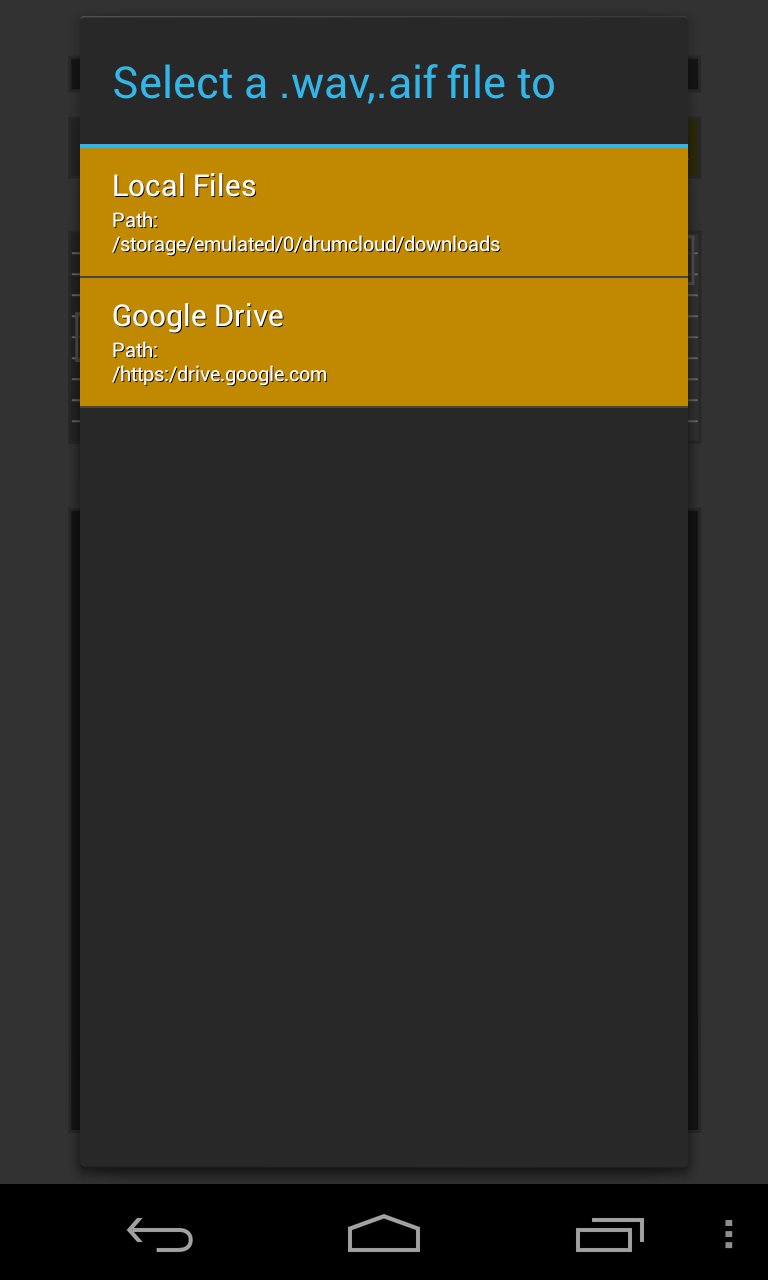
■ load samples from SD, internal storage or internet (Google Drive)
■ share your samples (Google Drive)
■ auto-normalize simultaneous samples
■ 16 sounds polyphony
■ File load/save (midi format)
■ Send your composition by email (to continue your production on your preferred desktop DAW)
■ MIDI controller (sender, receiver)
■ MIDI over WiFi, Bluetooth, ADB, USB host...
■ totally free
===========================
AUTOMATOR MODE - [NEW 1.1.0]
===========================
Creative multitouch sampler mode. Controls available:
- Main working mode menu [ON RELEASE]
- 4 animated rotatory knobs
- 2 submenus, one to select the current modified parameter and one to stop each of the samples.
- 4 click-drag zones, one for each sample type
Main working schemes: HOLD and STOP. When on HOLD mode the samples doesn't get stopped when you release the touch on the click-drag zones, on the contrary the STOP mode needs one or more fingers pressed on the click zones to get sound.
The 4 rotatory knobs control the repetition loop amount of each sample type (update when you touch again the corresponding touch zone). The LOOP submenu option changes automatically the value of this knobs when you drag up and down on the click zones.
The parameter submenu has the following options available: [ VOLUME | SAMPLE | LOOP | PITCH ] all of these are totally self-explanatory.
The delete submenu allows you to remove the selected sound type to a . It's only available on the HOLD mode.
The 4 click-drag zones are the main core the Automator mode. They are "multi-dragable" to allow you to modify 2, 3 or 4 parameters at the same time. Try all the modes combinations to find your prefered one.
Hint: to get better touch screen response try to avoid the interference caused by the near finger contact.
=========
LIVE MODE
=========
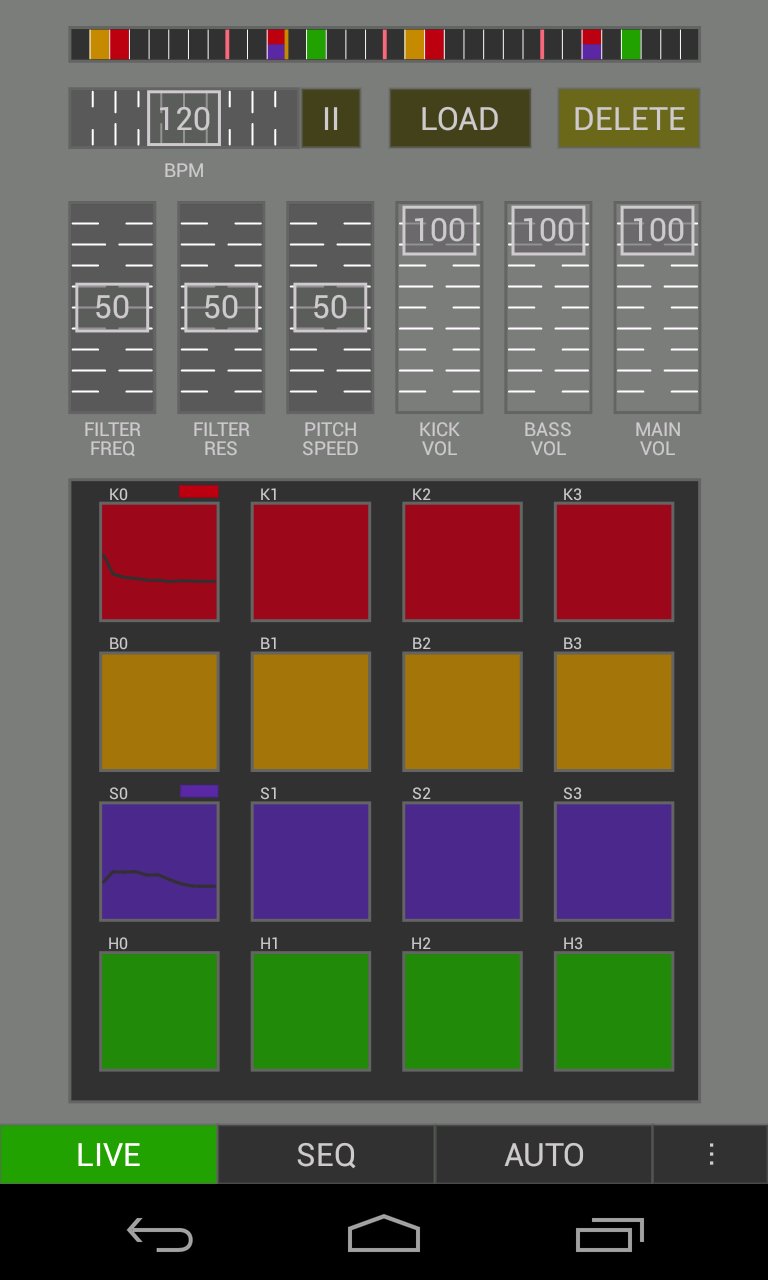
Basic sampler mode. Can be used in the default recording mode to compose simple loops using the different color pads:
Red pads: KICKS (K1,K2,K3,K4)
Orange pads: BASS (B1,B2,B3,B4)
Blue pads: SNARE and SIMILAR (S1,S2,S3,S4)
Green pads: HIT HATS and SIMILAR (H1,H2,H3,H4)
Using the upper-left slider you can increase or decrease the current BPM that's defaults to 120.
Using the LOAD button you can access your local stored samples or loading your preferred ones amongst the hundreds available on the CLOUD (from Google Drive storage). Feel free to share your founded or recorded sample with the app community to improved the sounds repertory.
Pressing the PLAY button you can switch from RECORDING to PAUSED mode to disable the recording and playback of the samples and allows you to use the Drum Cloud in a normal live instrument way.
Using the middle-top vertical sliders you can control various global audio parameters.
You can switch from LIVE to SEQUENCER mode using the app menu, located on the bottom-right of the screen.
================
SEQUENCER MODE
================
Using the sequencer view you can scroll horizontally/vertically and zoom in/out to get a more easy approach to exact sample triggering.
Clicking on any of the rectangles of the grid enable/disable the launch of each samples organized by sample type using different colors.
On the sequencer mini-map you can see your actual location and the location of the enabled samples.
Enjoy making your MUSIC with your new audio DRUM SAMPLER...
1.1.5
■ Added hundreds of new samples/loops on Google Drive
■ Added french language
■ Added option to support the DrumCloud development (free)
■ Solved some bugs (midi import, help tutorials...)
1.1.4
■ Changed play store link
1.1.3
■ Added "Feedback" option on menu (send us your requests, bugs and questions)
■ Some bug fixes




感谢您的评分和反馈!
您已经评分了。