APKPure에서 안전하고 빠른 APK 다운로드
APKPure는 바이러스 없는 Daily Sequential Watch Face APK 다운로드를 위해 서명 확인을 사용합니다.

정보 일상 생활에 대한 모든 arounder.
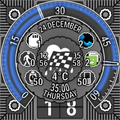
This watch face is designed as a dedicated information hub. It gathers all of the actual information in one convenient view: weather, battery values, step counter, pending notifications including unread messages and missed calls, even time left to the next calendar event with inbuilt activity that allows for a quick glance at next 10 events for the nearest month. When data item becomes obsolete (e.g. counter reaches zero or notification is dismissed) it is removed from view, since there is only finite amount of widgets that could be displayed simultaneously.
Inspired by MCT Sequential luxury watch line, actual time display is surounding this data array: minutes are presented on an open ring, where gap serves to show off hour of the day. Minute "horseshoe" rotates counterclockwise every hour while minute arrow moves clockwise at 3/4 of normal speed, thus always being at the necessary place at relevant time. Minute ring allows to set besel-like under hour "fire and forget" timers just by tapping inner area of the minute ring, those will warn you with vibration when time is elapsed.
Please note, that we are still looking for a design solution that will adopt round screens with "chin" while not hurting looks and functionality. Meanwhile, Moto 360 users are advised to set a fixed position for minute ring to avoid hours indicator being half-obscured at the six-o-clock position.
Inner circle contains all of the information grouped in uniform gear widgets. Besides showing relevant data items they also provide several utility shortcuts: watch battery - to watch settings, step counter - to default running activity (can be changed in Android Wear settings on the phone), phone battery - to our another trinket weaRDialer if it is installed on your watch. To open inbuilt activity, that shows nearest calendar events, tap on the upper quarter of the inner circle (day - month and time left to next event area). To read notifications it's necessary to enable notification listener service.
An inbuilt activity is started by tap on any notification related widget, which allows to view list and details (swipe left or tap list item) and dismiss notifications from watch (tap list item icon). Also there are details for weather view (forecast) and calendar events (location and description). In any of the detailed view, if there's a phone number found within text, it will be highlighted and becomes clickable, clicking the phone number will invoke either native system dialer or weaRDialer if it is installed on your watch. If there's a location set for a calendar event, then clicking on it will start google maps in a walking navigation mode.
Settings can be configured at the dedicated companion activity on the phone, which also features interactive watch face preview (excluding watch specific shortcuts). Application is created in such way, that turning off most of the interface elements either disables relevant block in data aquisition service, or lowers screen update frequency, providing better battery consumption on watch, thus it is recommended to experiment with settings to find appropriate combination of battery life, informativity and looks for your specific device. Default settings are optimized for Sony SmartWatch 3 always-on usage scenario.
Application is presented as a full-functional trial version, test period is 7 days long. After that you may either thank developer using in-app purchase to get trial-free application associated with your Google account, or feel free to reinstall application as many times as you like to continue testing.


등급과 피드백에 감사드립니다!
당신은 이미 평가했습니다.







