APKPure에서 안전하고 빠른 APK 다운로드
APKPure는 바이러스 없는 Device Locator APK 다운로드를 위해 서명 확인을 사용합니다.

다른 장치에서 보낸 명령을 사용하여 원격으로 장치를 제어하고 추적합니다.
WIth Device Locator you could manage your device remotely with SMS or commands sent from other device. You can also track your device location and record route.
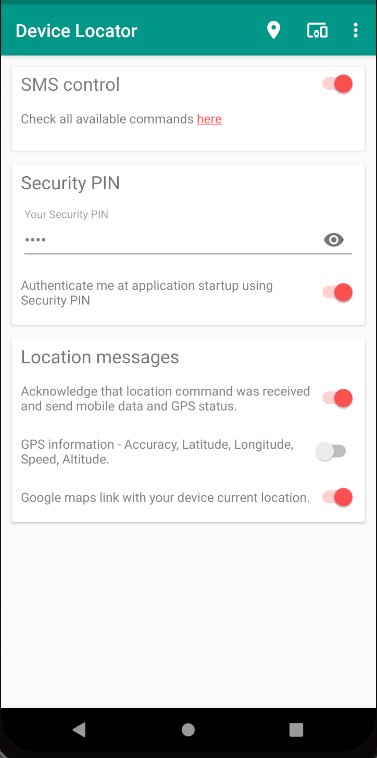
In order to execute remotely commands on Device Locator you need to send SMS message or command to your device with following syntax:
command security-pin parameters-if-needed
Security PIN is generated by Device Locator during application installation and you can find it and change it anytime on Security PIN card. Security PIN must be at least 4 digits. Remember to protect your PIN!
Following commands are available in Device Locator:
- Locate - send current device GPS location. Requires Location permission granted.
Usage: Locatedl
Example (assuming your security pin is 1234): Locatedl1234
- Hello - send test message to check connectivity with the device.
Usage: Pingdl
Example (assuming your security pin is 1234): Pingdl1234
- Ring - start playing ring tone on the device. If your ring tone is stored on device storage requires Storage permission granted. Send this command again to stop playing ring tone!
Usage: Ringdl
Example (assuming your security pin is 1234): Ringdl1234
- Start - start device location tracking and location recoding. Requires Location permission granted.
Usage: Startdl
Example (assuming your security pin is 1234): Startdl1234
- Stop - stop device location tracking
Usage: Stopdl
Example (assuming your security pin is 1234): Stopdl1234
- Resume - resume or start device location tracking and location recoding
Usage: Resumedl.
Example (assuming your security pin is 1234): Resumedl1234
- Route - send currently recorded locations route to the GMS World. You'll receive link to route map
Usage: Routedl
Example (assuming your security pin is 1234): Routedl1234
- Radius - change device tracking service radius in meters. Every time when device will move outside the area with the radius you'll be notified
Usage: Radiusdl x where x is number of meters > 0.
Example (assuming your security pin is 1234, and radius is 500 meters): Radiusdl1234 500
- Mute - mute device audio
Usage: Mutedl
Example (assuming your security pin is 1234): Mutedl1234
- Unmute - unmute device audio
Usage: Normaldl
Example (assuming your security pin is 1234): Normaldl1234
- Call - call sender. Device should initiate phone call to SMS sender number. Requires Phone permission granted.
Usage: Calldl
Example (assuming your security pin is 1234): Calldl1234
- Nofity - set or change who should be notified by location tracking service
Usage: Notifydl x where x is p:y for phone number, m:y for email address or t:y for Telegram chat id. You could set all parameters separately or together. Email address and Telegram chat id are subject for validation by it's owners.
Example (assuming your security pin is 1234, phone number is 123456789, email address is [email protected] and Telegram chat id is 987654321): Notifydl1234 p:123456789 m:[email protected] t:987654321
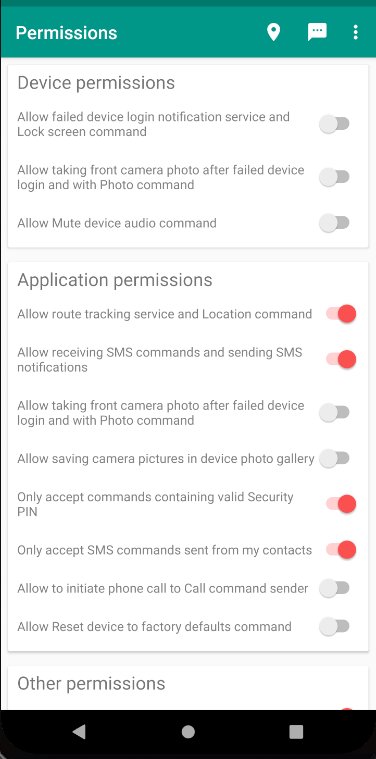
- Photo - take photo with front camera. You'll receive link to photo image. Requires enabled failed login service and Camera permission granted.
Usage: Photodl
Example (assuming your security pin is 1234): Photodl1234
- Config - change some Device Locator configuration.
Usage: Configdl x where x can be any of: lm:on, lm:off, gpsm:off, gpsb:on, gpsh:on, gpsb:off, nt:on. You could set all parameters separately or together.
Example (assuming your security pin is 1234, and you want to enable Acknowledge Location messages and Map link Location notification message): Configdl1234 lm:on mapm:on
For for information check http://www.gms-world.net/dl
* This app uses the Device Administrator permission *




등급과 피드백에 감사드립니다!
당신은 이미 평가했습니다.