APKPure에서 안전하고 빠른 APK 다운로드
APKPure는 바이러스 없는 GPS & LOCALISATION CHANGER APK 다운로드를 위해 서명 확인을 사용합니다.

이것은 당신이 당신의 전화를 원하는 위치를 선택할 수있는지도를 제공합니다.
NOTE: Your Android phone doesn't need to be ROOTED in order to use our location spoofer.
Please note that this app does not change your IP address, this is not a VPN. Applications/websites that check your location based on your IP address may still detect your real location.
Please use this app responsibly.
Please note that we are not responsible in any way how users choose to use this tool.
change location or you GPS changer is an app that help fake location or where your phone is located (Mock location for Android).
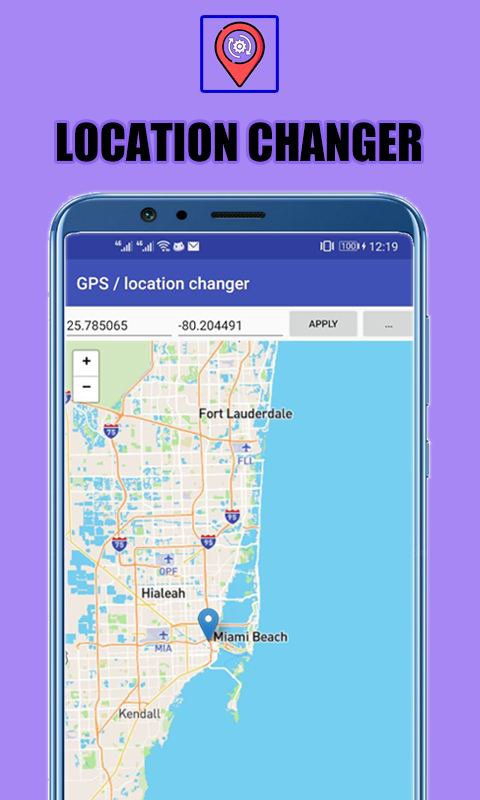
Sometimes you need to fake location of your device (for privacy or to test an app). GPS & LOCALISATION CHANGER provides you a map to select the location where you want your phone to be.
Change your GPS location using this simple app. Prevent apps and websites from tracking your real location. Test your location based apps. This app also shows detailed location information, so it can be used as a powerful location status tool. Set a pin on the map using a long press (same as Google Maps), you can also double tap to zoom in/out on the map.
How does it work?
Long press in the map where you want to be located or type the latitude and longitude, and tap the Apply button. Tapping the "..." button you will be shown two settings to mock the location over a period of time.
Requirements?
In order to work, you need to allow location changer to mock locations. You have to enable Developer options and select this app in "Settings/System/Developer options/Select mock location app" option.
What is "Mock locations"? Mock locations is a hidden setting in Developer options in the Android operating system that allows a device owner to set any GPS location for testing purposes. To enable Developer options go to your device Settings - About and tap Build number 7 times. This may be different on some devices, in this case you have to search how to do it for your device. Please use caution by not changing other system settings.
Now it can work as a system app without needing to enable Mock locations. Please search how to make it a system app as it can be different for each device. Also please note that this is a power user feature and we are not responsible if you cause any problems to your device in the process of making it a system app. To enable this mode go to Settings - Working mode - Root (system app). Please note that with Root mode the location may jump back to the real one on some devices - we recommend that you use this mode indoors where there is no GPS signal so it doesn't interfere. If you don't want to use it as a system app, you will need to enable Mock locations on your device from Developer options for the app to work.



등급과 피드백에 감사드립니다!
당신은 이미 평가했습니다.