Безопасная и Быстрая Загрузка APK на APKPure
APKPure позволяет легко и безопасно загружать Command block mod for Minecraft - mods for mcpe APK с проверкой подписи.

Блок команды невероятно полезно выполнение текстовых команд в Minecraft PE
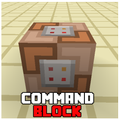
Command block mod is incredibly useful because it can be used for executing text commands in mods for minecraft. And it’s only triggered when there’s a redstone signal active. The block can process javascript and custom commands found in other mods for mcpe.
It’s one of those features which the PC version of mods for minecraft has by default but is not likely to be an official part of Pocket Edition for a long time.
How do these mods for mcpe work?
The Command Block (ID 137) can be obtained by using the creative inventory. It’s a block which when triggered by a redstone signal can execute both javascript and custom mcpe mods commands.
In this example we will be using the commands available in the X-Commands mod to explain how you can use redstone mod and the Command Block to switch time between day and night using our minecraft mods.
Begin by placing down the first Command Block which will be used for activating night-time with these minecraft mods. Tap on the block to set the activity to use. Here you can also enter JavaScript, e.g.: javascript: Level.setRainLevel(1); – this would turn on rain.
Then place down the second Command Block and let’s set it to execute the day function.
Now use the levers to trigger the redstone signal. The redstone signal will then transmit power to the Command Block which will in return execute the function it is setup to execute.
Command Block mod for minecraft
Commands blocks are the perfect solution for combining in-game text commands with redstone mod. In this example we will show you how you can control the weather by the simple use of some redstone and a activity line.
Place down a command block and connect it to a trigger of some sort, e.g. a lever. Tap on the command block with an empty hand and then type /rain in the textfield to select the activity for the block and then press “Done”. You can see a full list of available commands by typing /help and then choose one of your liking. It doesn’t work with custom commands.
But as soon as we turn the switch on it will send a redstone signal to the command block which in return will execute the activity line. And as you can see, it’s raining!
ATTENTION:
This application does use the internet to load new data, so please be aware of data usage!
Command block mod for MCPE is an unofficial App. We are not affiliated in any way with Mojang AB. ?ll property of Mojang AB or they respectful owner.



Один клик для установки XAPK/APK файлов на Android!

Спасибо за оценки и отзывы!
Вы уже оценили.