Package Name:com.lingolayer.app
Show More

84.7 MB
File Size
Everyone
Android 8.0+
Android OS
Translate text on your screen across apps, games, websites, images, and PDFs.
Translate text on your screen without switching between apps.
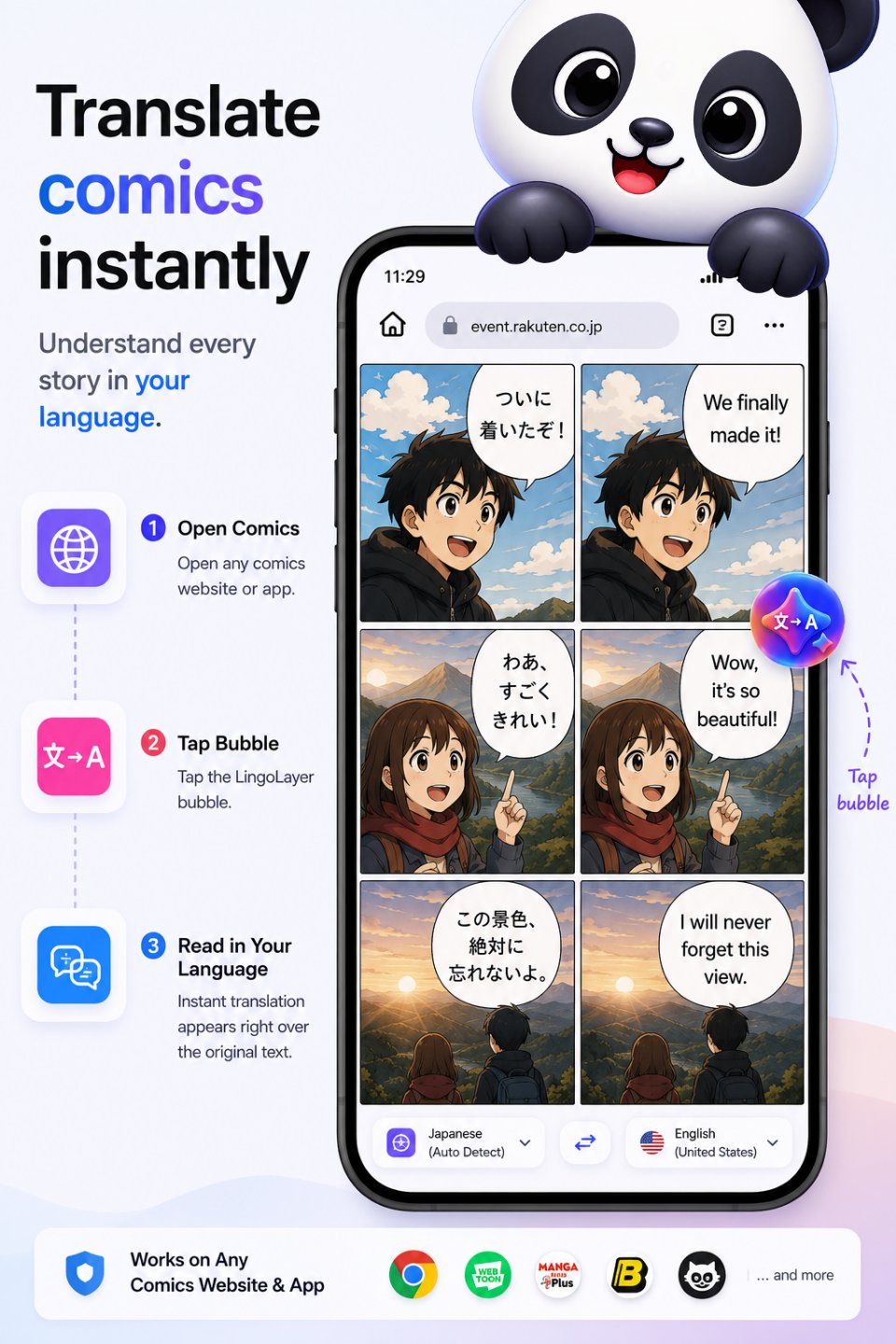
LingoLayer is a screen translator for Android that lets you translate visible text directly on your screen. Use the floating translator bubble to translate text inside apps, websites, games, social media, chat messages, images, PDFs, and other content.
Whether you're reading a foreign-language game, chatting with someone, browsing a website, scrolling social media, studying another language, or traveling abroad, LingoLayer puts translation where you need it — directly on your screen.
TRANSLATE ANYWHERE ON YOUR SCREEN
Tap the floating translator bubble to start a screen translation without leaving the app you're using. Hold the bubble to enter area-select mode, then drag over any part of the screen to translate exactly what you choose.
The translated text appears as an overlay, making it easier to understand foreign-language content while you continue reading and using the app underneath.
KEY FEATURES
• Floating translator bubble — quickly start a translation from anywhere
• Area select — hold the bubble and drag to choose any part of the screen to translate
• Screen translation — translate visible text inside other Android apps
• Image translation — translate text inside images and screenshots using on-device text recognition
• PDF translation — translate text from PDF documents displayed on your screen
• Overlay translation — see translated text directly over the content you're reading
• Live translation — automatically translate new text as it appears on screen
• 59 supported languages — including English, Spanish, Chinese, Japanese, Korean, French, German, Hindi, Arabic, Portuguese, and more
• Automatic language detection — identify the source language automatically
• Offline translation — translate on your device after downloading the required language packs
• Adjustable overlay — customize font size and opacity
• Excluded apps — choose apps where screen translation should remain disabled
• Translation cache — reuse recent translations for faster results and reduced processing
TRANSLATE GAMES, APPS, WEBSITES AND MESSAGES
LingoLayer can help when you're:
• Reading dialogue and menus in foreign-language games
• Browsing foreign-language websites
• Reading social media posts and comments
• Understanding messages in chat apps
• Chatting with someone who speaks another language
• Reading foreign-language information while traveling
• Studying and practicing another language
• Translating text inside images, screenshots, and PDF documents
With screen translation, you can understand content without repeatedly copying text, changing apps, or interrupting what you're doing.
PRIVATE ON-DEVICE TRANSLATION
LingoLayer is designed with privacy in mind. Translation processing takes place on your device, so the text you translate is not sent to a remote translation service.
No account is required to use the core screen translation experience.
Translation models can be downloaded to your device so supported languages can continue working without an internet connection.
For complete details about data handling, permissions, and privacy, see our Privacy Policy.
ACCESSIBILITY AND SCREEN ACCESS
LingoLayer uses Android screen and overlay capabilities to identify visible text and display translations over other apps. These permissions are required for the app's screen translation functionality and are used only for the features described in the app.
FEEDBACK AND SUPPORT
Have a question, found a problem, or have a suggestion? Contact us through the support options provided in the app.




One-click to install XAPK/APK files on Android!

Thanks for your rating and feedback!
You have already rated.