











Thanks for your rating and feedback!
You have already rated.

Watchface for Wear OS Watches
The Iris508 watch face offers a versatile and highly customizable experience for users, blending simplicity with a comprehensive set of features. It is designed for Android watches using API level 34 and above. Here's a summary of its main functions:
👀 Here’s a detailed overview of its features:
⌚Key Features:
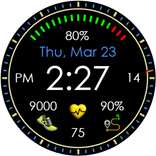
• Time & Date Display: Displays day, date, and month, with time shown in either 12-hour or 24-hour format, synced to the smartphone’s time settings.
• Health Metrics: Includes heart rate, step count, and step goal, with the heart rate icon changing color (white, yellow, red) based on your heart rate. The step count is an estimated value based on your steps
• Battery Information: Shows the battery percentage.
• Step Count: Counts your step count throughout the day.
• Distance Measurement: Shows distance traveled miles or kilometers, depending on whether the 12-hour (miles) or 24-hour (kilometers) time format is selected.
• Temperature: Current temperature is displayed.
• Customization: Features 8 color themes to change the appearance of the watch face. The Always-On Display (AOD) adapts to the selected theme but shows only minimal information to save battery.
• Language Support: Supports multiple languages (refer to the feature guide for details).
• App Short-cuts: The watch face has a total of 6 shortcuts. 4 Set and 2 selectable.
⌚Customization Options:
• Color Themes: You will have 8 color themes to choose from to change the look of the watch.
⌚Always-On Display (AOD):
• Limited Features for Battery Saving: The Always-On Display reduces power consumption by displaying fewer features and simpler colors compared to the full watch face.
• Theme Syncing: The color theme you set for the main watch face will also be applied to the Always-On Display for a consistent look.
⌚Compatibility:
• Compatibility: This watch face is compatible with Android watches using API level 34 and above.
• Wear OS Only: Iris508 watch face is designed specifically for Smart Watches using Wear OS operating system.
• Cross-Platform Variability: While the core features like time, date, and battery information are consistent across devices, certain features (such as AOD, theme customization, and shortcuts) may behave differently depending on the specific hardware or software version of the device.
❗Language Support:
• Multiple Languages: The watch face supports a wide range of languages. However, due to varying text sizes and language styles, some languages might slightly alter the visual appearance of the watch face.
❗Additional Information:
• Instagram: https://www.instagram.com/iris.watchfaces/
• Website: https://free-5181333.webadorsite.com/
• Using the companion app for installation: https://www.youtube.com/watch?v=IpDCxGt9YTI
❗Samsung Users:
Note for Galaxy Watch Users: The watch face editor in the Samsung Wearable app often fails to load complex watch faces to customize. This is not an issue with the watch face itself.
It is recommended if you have this problem, you can customize the watch face directly on the watch until Samsung resolves this issue. All features can be changed using this method.
Iris508 masterfully blends classic digital watch face aesthetics with contemporary features, making it a standout choice for users who value both form and function. Designed for high visibility and ease of viewing, it offers a stylish and practical solution for everyday wear. With its sleek design and user-friendly display, Iris508 provides a versatile option for those seeking both fashion and utility in a single device.



One-click to install XAPK/APK files on Android!
Thanks for your rating and feedback!
You have already rated.