










Thanks for your rating and feedback!
You have already rated.

MKW Weather Dashboard with Multiple Features for Wear OS and Galaxy Watch
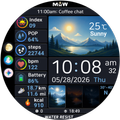
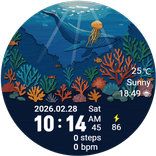
MKW Digital Dashboard 2 | Weather Data Watch Face for Wear OS
Important Notice
This watch face is supported on Wear OS or Samsung Galaxy Watch devices running One UI 6.0 or higher.
This application is designed exclusively for smartwatches.
Users without a compatible smartwatch will not be able to use the watch face after purchase.
Watch Face Features
• Digital dashboard watch face design
• Large digital time display with AM/PM and seconds
• Date and weekday display
• Weather and temperature display
• Chance of rain display
• UV index display
• Sunrise / sunset information
• Moon phase display
• Step counter
• Distance display in km and mi
• Kcal display
• Battery percentage display
• Heart rate display
• Day, evening/dawn, and night visual indicator
• 15 color themes
• AOD layout editing option
• 6 editable complication areas
Latitude & Quarter-Based Time-of-Day Indicator
This watch face includes a visual time-of-day indicator for day, evening/dawn, and night.
• The displayed image changes based on the selected latitude and season
• Latitude can be changed in the Customize menu
• Select Northern Hemisphere, Equator, or Southern Hemisphere according to your region
• The display timing is approximate and should be used as a reference
Color Themes
• Includes 15 color themes
• Choose a color style to match your mood and daily use
• The dashboard layout remains clear while changing the overall color tone
Complication
This watch face supports 6 complication areas.
• Slots 1, 2, and 3: App Shortcut default provider
• Slot 4: Unread notification count default provider
• Slot 5: Sunrise / Sunset default provider
• Slot 6: Next Event default provider
Complication availability and displayed content may vary depending on the device, app, and provider.
Usage Notes
• Heart rate information is displayed based on data measured by the watch’s heart rate application.
• Weather data may vary depending on the connected provider.
• The day, evening/dawn, and night image timing is approximate and should be used as a reference.
• Temperature, weather, UV index, chance of rain, and sunrise/sunset information may vary depending on the connected provider and device settings.
MKW Installation Guide
The “MKW Installation Guide” app is a companion application that helps install the watch face on Wear OS devices.
MKW products include a smartphone companion app, and the “MKW Installation Guide” supports Wear OS watch face downloads only.
Community & Support
• Blog: https://excing4860.tistory.com/
• Email: excing4860@naver.com



One-click to install XAPK/APK files on Android!
Thanks for your rating and feedback!
You have already rated.