











Thanks for your rating and feedback!
You have already rated.

O Watchface is a Wear OS watchface app for personalizing smartwatch screens.
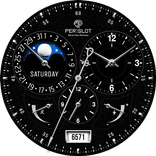
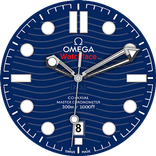
Developed by Citadelle du web, O Watchface focuses on realistic luxury mechanical watch styles for users who prefer a classic analog look. It lets you shape the face directly on the watch, so the final result is easier to judge on the actual screen. For anyone searching for O Watchface download options, the main appeal is detailed visual control without moving away from the smartwatch. Key features include:
O Watchface is built around the look of a traditional mechanical watch rather than a busy digital dashboard. Its faces use analog dials, shaped hands, and polished color combinations to make a Wear OS watch feel closer to a classic wristwatch. This matters in daily use because the watch can look more suitable with formal clothing, office wear, or a simple dark strap.
The visual style works best when the watch has a round screen, since the dials are designed to match the shape of classic watches. On square or unusual screen shapes, the same design may still run, but the fit can feel less natural. Users who care most about a clean analog appearance should check how each face sits on their own device before settling on a final design.
O Watchface lets users create and adjust a watchface directly on the Wear OS watch. This is useful because the design can be judged at the same size and brightness where it will actually be used. Instead of guessing from a phone preview, the user can see whether the dial is readable, whether the hands stand out, and whether the overall style feels balanced on the wrist.
The editing flow usually starts with choosing a preset face or beginning from a blank design. From there, users can pick a dial style and watch how it appears on the screen. This is not meant to feel like a full design studio, but it gives enough control for everyday smartwatch personalization. After applying a design, returning to the watch home screen helps confirm whether the face looks right during normal use.
O Watchface gives users control over the main parts that define an analog watchface. Dial choices shape the base look, hand styles affect how the time is read, and color settings change the mood of the design. A simple black dial with subtle hands can feel formal, while brighter colors can make the face easier to notice during quick glances.
The strongest part of this feature is the balance between presets and fine adjustment. A user can start with a ready-made face when speed matters, then adjust the hands or colors to better match a watch strap or personal style. The number of options may feel a little busy at first, especially for new users, so starting from a preset is the more practical route before building a face from scratch.
O Watchface supports most Wear OS smartwatches, which makes it a flexible option for users who want a luxury-style watchface without needing a high-end device. The app is mainly designed for Wear OS, so checking the watch system before installation is important. It does not support Tizen OS or HarmonyOS watches.
In real use, compatibility also depends on screen shape and device behavior. Round Wear OS watches are the best match for the analog dial style, while non-round models may not show every design as cleanly. Some users may also see occasional bugs or crashes when switching or adjusting faces. If that happens, applying a simpler preset first can help confirm whether the issue is tied to a specific design choice.
These points reflect how O Watchface performs as a Wear OS watchface editor, especially for users who value analog styling and direct smartwatch editing.
ProsYou can download O Watchface latest version from APKPure and install it on a compatible Wear OS smartwatch. The listed package size may vary by version and device, so it is worth checking the APK details before downloading, especially when using mobile data or limited storage.
After downloading the O Watchface APK, the main thing to confirm is the watch operating system. Wear OS devices are supported, while Tizen OS and HarmonyOS watches are not suitable for this app. Once installed, users can open the editor on the watch, try a preset face first, and then adjust the dial, hands, and colors until the display feels comfortable for daily use.



One-click to install XAPK/APK files on Android!
Thanks for your rating and feedback!
You have already rated.