Bezpieczne i Szybkie Pobieranie APK na APKPure
APKPure używa weryfikacji podpisu, aby zapewnić bezpieczne pobieranie plików APK FlipClock Nice Clean bez wirusów dla Ciebie

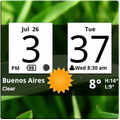
Android Digital clock widget with Calendar, Time, System info,weather & forecast
Android Digital clock widget with Calendar, Time, System info,weather & forecast
A Digital Clock widget with size 4x2
It features:
140 skins
12/24 hr+Color on all info displayed
System Stats Info + pop-up
Weather & Forecast (International)
+tap bottom right->preferences
+tap bottom left->system information dialog
+tap weather icon->forecast
+tap Hours tab->launch anything!(more coming)
+tap Minutes tab->launch anything!(more coming)
Widgets on Android work a bit differently than a normal application. Unlike regular programs they don't just install themselves in the application tray so you have to add them manually. They will not open or launch.
Here's how to add a widget on your Android home screen.
STEPS HOW TO ADD A WIDGET
==========================
1.On your Android home screen, tap any blank or “empty” area with size 4x2 and hold down your finger.
2.An “Add to Home screen” window will pop up. From that window, tap “Widgets”.
3.You’ll be presented with a list of all the installed Widgets on your Android device.
4.Select the "FlipClock Nice Clean” to add to your home screen by tapping it.
Notes
=====
"Time frozen/not updating"-> taskiller killed the clock(exclude it from taskillers)
When phone starts, clock starts in less than a min too.
ROM users-> make sure the clock is NOT moved on SD card.
Widgets are not supposed to be on SD card. Move it back to the phone storage.
Weather hint: For world destinations with two words in the name, type in the box the words with a plus sign.
For example "Buenos Aires" type "Buenos+Aires",remember the "+" sign -no spaces, don't include the quotes.
Email problems/suggestions
Check our website for more help.
EXCLUDE IT FROM TASKILLERS!!!
Be polite, this is a free app :-)
VIDEO HOW TO ADD WIDGETS
http://www.youtube.com/watch?v=DpMLF9b2aTQ



Jedno kliknięcie, aby zainstalować pliki XAPK/APK na Androidzie!

Dziękuję za ocenę i opinie!
Już oceniłeś.