Package Name:com.remindalarm
Show More

Visual photo reminders and voice alarms on your lock screen. Private, offline.
Most reminders tell you what to do. RemindAlarm lets you see exactly what you meant to remember.
📸 Take a photo → 🎤 add your voice → ⏰ choose when to be reminded.
When the time comes, your photo appears full-screen on your lock screen and your optional voice recording plays automatically.
Instead of “Buy the charger,” see the exact charger you need. Instead of “Take your medicine,” see the actual medicine and hear your own instructions.
ONE-TIME PURCHASE
No subscription. No ads. No account required.
WHY USE RemindAlarm?
1. SEE THE EXACT THING YOU NEED TO REMEMBER
A photo can contain information that a short text reminder can't.
📱 Remember which charger you need.
🚗 Remember which car part you need.
💊 Remember what the medicine looks like.
🛒 Remember exactly which product to buy.
🔧 Remember what needs fixing.
📄 Remember which document or page you need.
Anything you can photograph can become a reminder.
2. ADD YOUR VOICE (OPTIONAL)
A photo tells you what to remember. Your voice can explain why, how, or what to do next.
📸 Product photo → 🎤 “Buy the large one, not the small one.”
📸 Medicine photo → 🎤 “Take two after breakfast.”
📸 Repair photo → 🎤 “Ask for this exact replacement part.”
Use your own recording, a music/audio file, or vibration only.
Your saved photo + voice reminders can also preserve the context of what you wanted to remember.
3. MAKE IMPORTANT REMINDERS HARDER TO MISS
When the reminder fires, the photo appears full-screen on the lock screen instead of being buried among ordinary notifications. You see the context immediately and can hear your optional voice reminder.
BUILT FOR QUICK REMINDERS — NOT ANOTHER TASK MANAGER
RemindAlarm focuses on individual time-based reminders, not managing projects, tasks, or to-do lists.
Capture it now. See it when you need it.
📸 HOW IT WORKS
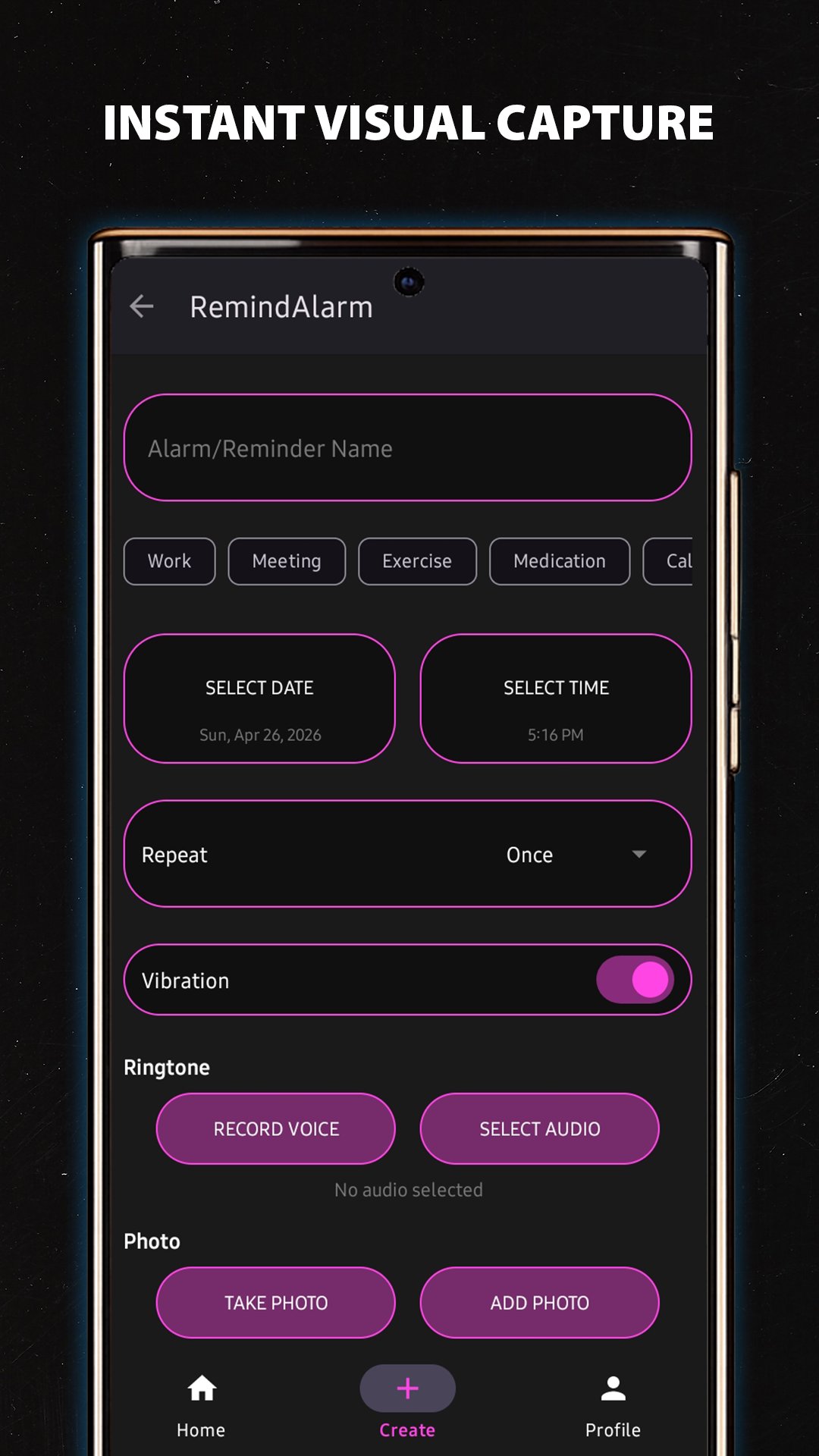
• Tap + to create a reminder.
• Take a photo or choose one from your gallery.
• Add an optional voice recording.
• Choose the time and repeat schedule.
• Save.
Preview and edit saved reminders, then delete them with a swipe left.
🔐 PRIVATE BY DESIGN
RemindAlarm works offline, so your reminder data stays on your phone.
• No internet connection required.
• No ads or subscriptions.
• No account required.
• No tracking.
• No data shared with third parties.
• Photos and voice recordings aren't uploaded to a cloud service to create reminders.
💾 BACKUP & RESTORE
Backup and restore your saved reminder data and media when you need a backup or move to another device.
⏰ REMINDER & ALARM FEATURES
📸 Photo reminders
🎤 Optional voice reminders
🔔 Full-screen lock screen reminders
🎵 Custom audio/music
📳 Vibration-only reminders
🔁 Daily, weekly and monthly repeat options
👀 Preview saved reminders before editing
🖼️ Camera or gallery photos
💾 Backup & Restore
🕐 12-hour and 24-hour time formats
📵 Works offline
WHO IS IT FOR?
RemindAlarm is useful if ordinary text notifications are easy to forget, if you want visual reminders with real context, or if you prefer a focused reminder app instead of a full task-management system.
Use it for shopping, home projects, studying, family tasks, medication, pets, errands, and anything else you can photograph.
Visual cues can also be useful for people who find them helpful for focus and remembering tasks, including some people with ADHD. RemindAlarm is not a medical or therapeutic app.
⚙️ FOR RELIABLE REMINDERS
Android and some phone manufacturers can restrict background activity to save battery. This can affect alarm and reminder apps.
For reliable reminders:
• Allow the required notification and alarm permissions when requested.
• If your phone offers battery settings for the app, set RemindAlarm to Unrestricted.
• If reminders are delayed, check your phone's battery/background restrictions for RemindAlarm.
Take a photo now. Add your voice if you want. See it when you need it.



One-click to install XAPK/APK files on Android!

Thanks for your rating and feedback!
You have already rated.