Package Name:com.avicena.appblocker
Show More


32.4 MB
File Size
Everyone
Android OS
Block apps, set usage limits, and track weekly screen time reports.
App Blocker helps you take control of how you use your apps.
Block distracting applications, set daily usage limits or timed locks, and review your weekly usage to better understand where your time goes.
CONTROL APP USAGE
Choose the applications you want to restrict and set usage limits that fit your routine.
• Block selected applications
• Set timed app locks
• Set daily usage limits
• Lock applications when needed
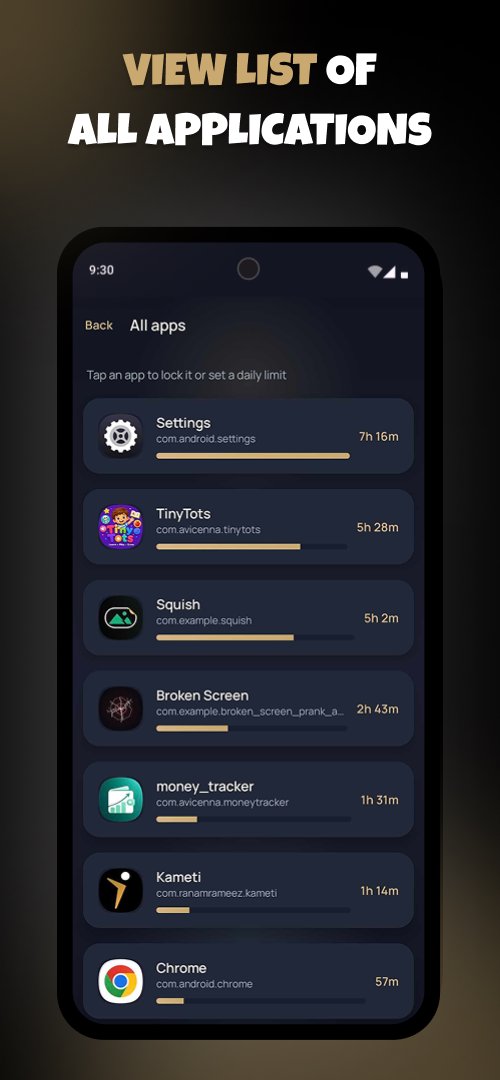
• View your installed applications
• Review application usage
UNDERSTAND YOUR USAGE
Use clear usage information to see how much time you spend in different applications.
Weekly usage reports help you review your activity and identify which apps are taking up the most of your time.
SET LIMITS THAT FIT YOUR ROUTINE
Different apps require different limits. Set the appropriate usage limit for each application and manage your daily app usage more intentionally.
REDUCE DIGITAL DISTRACTIONS
When an application becomes a distraction, use App Blocker to restrict access and keep your attention where you want it.
Whether you're trying to stay focused while working, studying, or simply want more control over your daily phone usage, App Blocker gives you practical tools to manage app access and usage.
TAKE CONTROL OF YOUR APP USAGE
- Block apps.
- Set usage limits.
- Review your usage.
- Build better control over your screen time.
- Start managing your app usage with App Blocker.
ACCESSIBILITY SERVICE
App Blocker uses the Android AccessibilityService API to detect which app is currently open and enforce the blocking rules you choose.
When you open an app you have locked, or reach its daily usage limit, App Blocker displays a blocking screen to help you manage your app usage.
Accessibility access identifies the foreground app for this functionality. App Blocker does not read messages, passwords, or other text displayed inside your apps.
You choose whether to enable Accessibility access and can disable it at any time through your device’s Accessibility settings.



One-click to install XAPK/APK files on Android!

Thanks for your rating and feedback!
You have already rated.