











Thanks for your rating and feedback!
You have already rated.

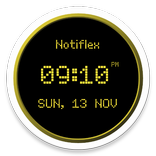
Clock widget with seconds, custom fonts, gradients and an event countdown.
Your clock, your style.
Clock Widget + brings a customizable digital clock to your Android home screen. Keep it clean and minimal or give it character with expressive fonts, colors and gradients. A live preview lets you see your changes as you customize.
MAKE IT YOURS
• Choose a built-in font or import your own TTF or OTF file.
• Adjust text size, bold and italic styling.
• Pick text and background colors with an intuitive color picker.
• Create a two-color linear gradient with a choice of directions, or a radial gradient.
• Adjust background transparency or turn the background off entirely.
• Enable fixed-width digits to keep the clock steady as the seconds change.
CHOOSE WHAT TO SHOW
• A digital clock with optional seconds.
• 12- or 24-hour time, optional AM/PM and a leading hour zero.
• Several date formats, including your phone's default, and an optional weekday.
• Your next system alarm and a shortcut to alarm settings.
• An event countdown showing its name, days, hours and minutes.
• A rounded battery bar with adjustable thickness, an optional percentage and a connected-power indicator.
EASY TO CUSTOMIZE
Clear settings categories and a live preview make setup straightforward. The settings follow your phone's light or dark theme. On supported launchers, hold the preview to add the widget to your home screen.
Clock Widget + is free and contains no ads. It supports Android 7.0 and later, including Android 17.
KEEPING TIME
On newer Android versions, minute-by-minute updates may require permission for alarms and reminders. Showing seconds requires disabling battery optimization for the app. The settings guide you to the relevant permissions. The clock does not update periodically while the screen is off.



One-click to install XAPK/APK files on Android!
Thanks for your rating and feedback!
You have already rated.