Package Name:com.shiksha.controlcenter
Show More

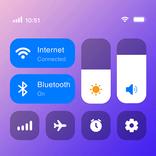
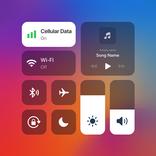
Quick access to brightness, volume, music, apps & system controls.
Take control of your Android device with Control Center — a simple, fast way to access frequently used settings, media controls, apps, and device functions from one convenient panel.
Control Center gives you quick access to essential controls without searching through multiple system menus. Adjust brightness and volume, control music, open your favorite apps, and customize the controls you use most.
# Key Features
• Quick Settings Access
Access frequently used device controls quickly from the Control Center.
• Brightness & Volume Control
Adjust your screen brightness and device volume with convenient controls.
• OS-Style Quick Toggles
Use a familiar, streamlined control-center experience on your Android device.
• Music Controls
Control music and media playback directly from the panel.
• App Shortcuts
Add your favorite apps for faster access whenever you need them.
• Customizable Controls
Add, remove, or rearrange controls to create a Control Center that fits your needs.
• Personalization Options
Customize your control experience and keep frequently used functions within easy reach.
# Simple & Convenient
Control Center is designed to make everyday device controls faster and easier to access. Instead of navigating through different settings, bring commonly used functions together in one convenient place.
The app may request permission to read and display notifications on the lock screen to support its control-center experience.
# Accessibility Service Permission
Control Center uses the Android Accessibility Service API for core features such as screen lock, screenshots, and quick system controls from the on-screen Control Center.
The Accessibility Service is used only to perform the actions requested by the user.
• Does not read screen content
• Does not track user activity
• Does not collect personal data
Accessibility permission is required only for the requested functionality.
# Important Information
Control Center is an independent Android application. It is not an official Apple, iOS, or iPhone application and has no affiliation, authorization, association, endorsement, or connection with Apple.
If you have questions or experience an issue with the app, please contact our support team.



One-click to install XAPK/APK files on Android!

Thanks for your rating and feedback!
You have already rated.