Scan Date:Nov 22, 2026
Show More


7.6 MB
File Size
Everyone
Android 9.0+
Android OS
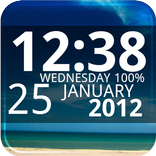
Digital world clock widgets for any city and time zone, styled your way
Keep the time of family, friends and colleagues abroad right where you can see it. With DIGI World Clock, a glance at your home screen tells you whether it is a good moment to call, and every clock looks exactly the way you set it up.
Any place on Earth
• More than 400 cities and time zones built in
• Online search for any other city or place
• Up to 50 clocks, each with its own time zone and design
• Give each clock a name of your own
Everything you want to know
• Time in 12-hour or 24-hour format, with or without seconds
• Date in a wide choice of formats
• Optional time difference from your own time, with a note when it is already tomorrow or still yesterday there
• Optional UTC offset and daylight saving time indicator
Make it yours
• More than 120 ready-made themes, from black and white to neon, pastel and retro
• Separate colors for the hours, minutes, seconds, date and name
• A choice of fonts for the time, the date and the name
• Transparent, solid color or gradient background with adjustable opacity
• Adjustable time size and left, center or right alignment
• A live preview that shows every change right away
On your home screen
• Add a widget straight from the app, or from the widget list of your home screen
• Resize it freely, the clock fits itself to the space
• Choose what a tap opens: the alarm clock, the timer, the calendar or any app you pick
• Optional separate tap actions for the time, the date and the name
• Edit a clock in the app and its widgets update with it
Also included
• All your clocks side by side in the app
• The ticking time is drawn by the system, so the widget is easy on the battery
• Your clocks are included in your device backup
• Light and dark app theme
• Available in more than 40 languages
Every feature is available to everyone. The optional Premium edition, a one-time purchase, removes ads and supports further development.
To start, open the app, pick a city and choose a theme.



One-click to install XAPK/APK files on Android!

Thanks for your rating and feedback!
You have already rated.