








Thanks for your rating and feedback!
You have already rated.

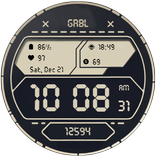
GRBL Digital: 8 themes, clear look, 4 complications Stay stylish and on schedule
WARNING! notification dot may be misaligned with the circle on 47mm watches like Galaxy Watch 6 Classic!
You've been warned!
Features:
1. Supports AM/PM
2. Steps counter
3. Hour with seconds
4. Steps counter
5. Date
6. Always on display
7. Four changeable complications
!!!DESIGNED FOR SAMSUNG SMARTWATCHES! THE ORANGE DOT APPEARS WHEN THERE'S AN UNREAD NOTIFICATION!!!
PLEASE KEEP IN MIND THAT THE COMPANION APP DOESN'T INSTALL WATCHFACE ON THE WATCH. PLEASE READ INSTRUCTIONS BELOW.
There are two ways to install this watchaface:
From PLAY STORE APP:
1. Use the drop-down menu and select the target
device on the PLAY STORE APP:
after a few minutes the watch face will transferred on
watch.
2- ACTIVATE WATCH FACE:
Once installed, you need to activate the watch face.
Long press screen, swipe left and tap "ADD WATCH
FACE" to activate it.
From PLAY STORE WEBSITE:
1 - Go to the watch face link through a Web Browser on
PC / Mac such as Chrome, Safari (etc.). You can search
the watch face name on Play Store.
Click on "Install on more devices" and select the target
device:
after a few minutes the watch face will transferred on
watch.
2- ACTIVATE WATCH FACE:
Once installed, you need to activate the watch face.
Long press screen, swipe left and tap "ADD WATCH
FACE" to activate it.
Please keep in mind that any issues on this side are
not caused by the developer/watchface. I have no
control over Google's issues.
Before drop a negative feedback (1 star) on Play Store
for these reasons, please read the guide carefully or
contact me:
for API 28+
Remember , if you want your watch to show phone's battery status, you should install Phone Battery Complication app



One-click to install XAPK/APK files on Android!
Thanks for your rating and feedback!
You have already rated.