Safe & Fast APK Downloads on APKPure
APKPure uses signature verification to ensure virus-free iLock screen APK downloads for you.

Smart iLock with custom notification
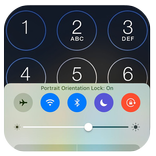
Customize your lock screen. Lock screen with notifications and iOS 16 interface.
🔐 How to use “iLock”?
- Download “iLock – Lockscreen iOS 16” on Google Play
- Open app and go to iLock’s setting
- Allows get notifications to show on lockscreen
- Enable lock screen
- Swipe down from the top-left corner to open
- Set passcode for lock screen
🔐 Main features:
- The iLock Screen, which shows the current time and date and your most recent notifications, appears when you turn on or wake your phone
- From the iLock Screen, you can see notifications, open Camera and Turn on flash
- From the lock screen, get notification from your apps
- Lockscreen with notifications
- Lockscreen no ads
- Show notification on the lock screen
- Set a passcode on your phone to help protect your phone.
- Enable Passcode and enter passcode.
- Allows enter your passcode again to confirm and activate it.
- Long press on Flash to turn on/turn off Flash
- Long press on Camera to open Camera
- 100+ unique iOS wallpapers available
- Free for everyone
- you can use Spotlight from the lock screen
- You can also do this from the lock screen:
🗝️ Tap one notification or a group of notifications to see all of them for that app.
🗝️ Swipe over notifications to manage, view or delete notifications.
🗝️ Manage notifications for specific applications.
🗝️ Allows to hide message content on lock screen.
Permissions containers by app:
🔐 CAMERA: To open camera in your phone from the lock screen
🔐 READ_PHONE_STATE: To turn off lock screen while calling.
🔐 NOTIFICATION ACCESS: To get notifications in your phone.
🔐 READ/WRITE_EXTERNAL_STORAGE: To download and save more wallpapers.
🔐 DRAW OVER SCREEN: To show Lock Screen & Notification in over all apps.
🔐 QUERY_ALL_PACKAGES: To use this permission, your app must fall within permitted uses below, and have a core purpose to search for all apps on the device.
🔐 BIND_ACCESSIBILITY_SERVICE to allow apps to draw on phone's lock screen and status bar. The app needs to use this permission to open the iLock by swiping from the top left edge of the screen and commit not to collect any other information. We do not sell, trade, or otherwise transfer your personally identifiable information to outside parties.
if you have any feedback/issue regarding this app then you can contact at [email protected]
======



One-click to install XAPK/APK files on Android!

Thanks for your rating and feedback!
You have already rated.