Package Name:com.krosswind.computer
Show More

Offline E6B & CX-3 flight computer: weight & balance, nav log, weather & more.
Krosswind Computer is a complete, offline-first flight computer for general aviation pilots — an E6B and CX-3 replacement that keeps working when you have no signal, plus flight planning, preflight briefing and in-cockpit tools built for real flying, and checkride-ready: every number shows its formula, your inputs and where they came from.
Everything runs on your device. No account, no sign-up, and your data never leaves the phone.
FREE, FOREVER — THE FLIGHT COMPUTER
• True airspeed, Mach, density & pressure altitude, ISA deviation
• Wind correction, heading, groundspeed, crosswind & headwind components
• Fuel burn, endurance, range; climb, descent, top-of-descent, glide
• Time-speed-distance, off-course correction, holds, VDP, lead turns
• Takeoff & landing distance with density altitude, wind, slope, surface and a 50-ft obstacle
• Magnetic variation from the NOAA world magnetic model
• Every unit conversion
ASK — PLAIN-ENGLISH ANSWERS
Type "glide distance at 150 kt from 10,000 ft" and get the answer instantly, offline, with the math shown the way it's taught.
FREE ROUTES & NAV LOG
• Unlimited waypoints, each leg at its own altitude
• Fuel by phase: start, taxi, run-up, climb, cruise, descent, approach, taxi-in, plus the legal reserve
• VFR/IFR cruising altitude and minimum safe altitude checks
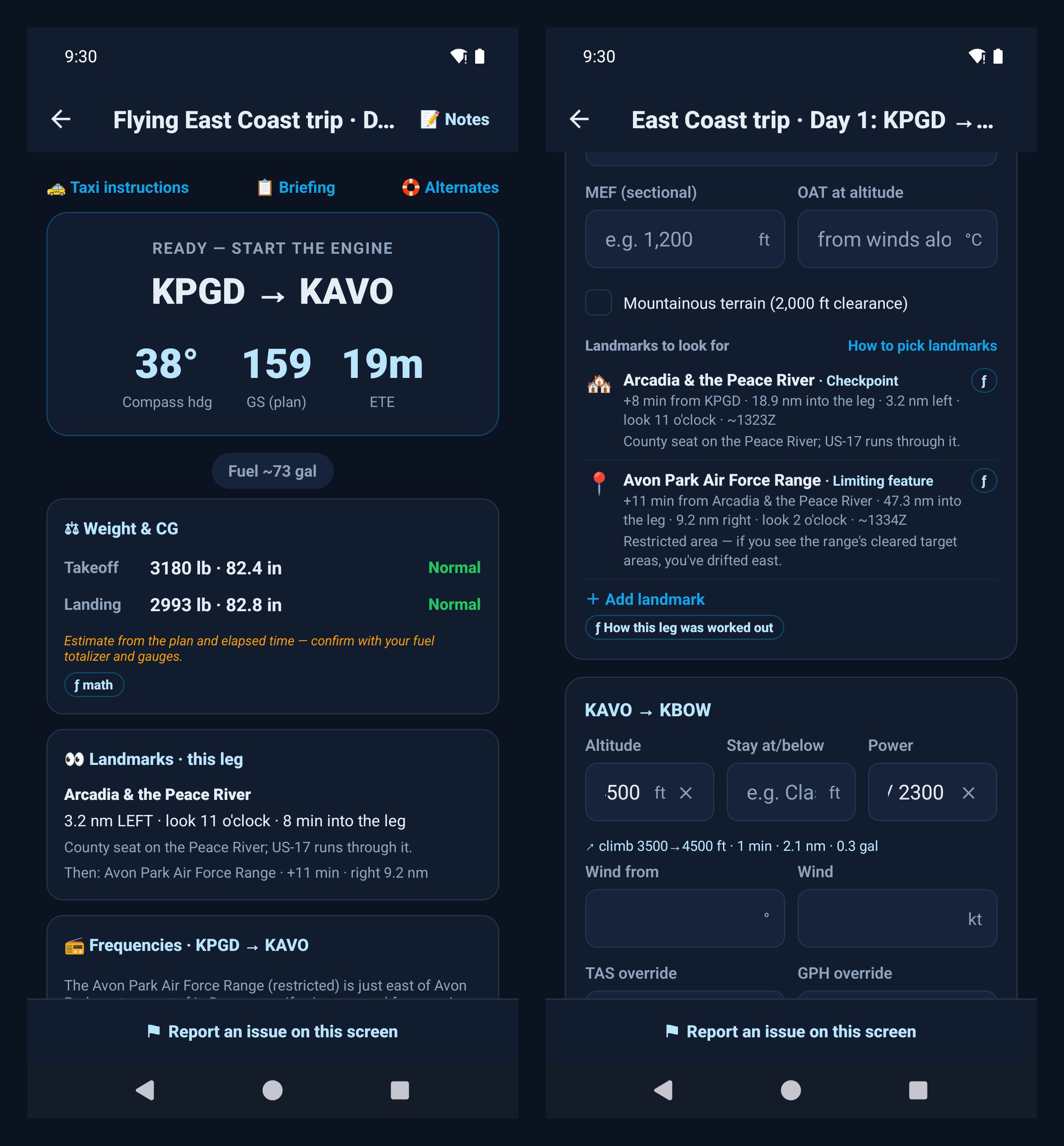
• Fly it live from engine start to shutdown: stamp checkpoints, planned vs actual, fuel checks against your gauges, ETAs revised from the real wind
• Landmarks for pilotage, IFR clearance and lost-comms cards, nav log PDF
PERSONAL MINIMUMS — FREE
Set limits stricter than the rules — e.g. a 45-minute day / 1-hour night fuel reserve instead of the legal 30/45. Ceiling and visibility for VFR day, night and IFR; wind, gusts and density altitude; terrain clearance and max altitude; and per aircraft, max takeoff and landing weight and the shortest runway you'll use. Every check uses the stricter of yours and the legal limit.
ALSO FREE
• METAR & TAF decoder in plain language
• Quick Templates: ATIS, IFR clearance, taxi instructions with readback
• Notes scratch pad, checklists, reference cards
• Sun times, Zulu/local clocks, timers, passenger briefing
• Red night mode for the cockpit
KROSSWIND PRO — ONE-TIME PURCHASE
No subscription. Buy once, and every future improvement is included.
• Aircraft profiles with POH cruise tables, climb/descent and fuel system
• Weight & balance and CG from engine start to landing, with tank-order checks and fuel-tank switching reminders
• Preflight briefing: SIGMETs, G-AIRMETs, PIREPs, CWAs and TFRs along your route at your altitude and time, runway performance, airworthiness and risk assessment
• Alternates near departure, along the route and at the destination, with METAR now and TAF at your ETA against minimums, divert fuel and engine-out glide reach
• Divert now from GPS, nearest airports, winds aloft, route weather
• ICAO flight plan and a one-tap flight package PDF
• Go / No-Go board against your personal minimums
• Offline airport & runway database and crosswind-by-airport
• Logbook with currency and ForeFlight CSV import
• Ownership, maintenance, ADs and a document vault with expiry reminders
• Backup, restore and exports
You can open every Pro screen and look around with sample data before you decide.
Built for pilots, by pilots. Android now, with iOS to follow.
IMPORTANT — SAFETY
Krosswind Computer is a planning and computational aid, not a substitute for your aircraft's approved flight manual (POH/AFM), current charts, NOTAMs, official weather briefings, or manufacturer data. All results depend on the data you enter and on simplified models and may contain errors. As pilot in command you are responsible for the safe conduct of every flight and must verify all figures against authoritative sources. See our Terms of Service and Privacy Policy for details.





One-click to install XAPK/APK files on Android!

Thanks for your rating and feedback!
You have already rated.