Scan Date:Oct 8, 2024
Package Name:com.smartartstudios.digitalforcefree.interactive.watchface
SHA-256:76072eb5f2c0ed7fd23be317833ba7fdd87baa640a29d06bf684d3aae95ddc6a
SHA-1:be378909cbdb02596a59e12c5db45d167a4a9bae
Show More


17.5 MB
File Size
Everyone
Android 4.4+
Android OS
Military Style Watch Face & Clock Live Wallpaper for Phones & Wear OS SmartWatch
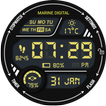
Marine Digital Interactive Watch Face !! A Unique Military Style Watch face and Clock Live Wallpaper with Hourly Chime Sound effect, Touch Sound Effects and many Interactive Features for Phones and Wear OS 4.0 Smartwatches.
★Tap Features (*Available Only in Premium Version)
❖ Tap on "CENTER" of Watch face to change colors of watch face with Touch.
❖ Tap on "STOPWATCH" on Upper Left corner of Watch face for Interactive Stop watch.
❖ Tap on "SETTINGS" on Upper Right corner of Watch face for Settings Shortcut.(Available in Free Version).
❖ Tap on "FLASH" on Lower Right corner of Watch face for Flashlight App.(Available in Free Version).
❖ Tap on "TIMER" on Lower Left corner of Watch face for Timer App.(Available in Free Version).
❖ Tap on "DATE" on Lower Side of Watch face for Agenda App.
❖ Tap on "WEATHER" on main Watch Face to get 4 days Weather Forecast and Other Weather Info.
❖ Tap on "STEPS" to Get Google Fit Data
❖ Double Tap on "LIVE WALLPAPER" to Speak the Time and Change the colors
❖ Watch Face Fusion is fully compatible with Wear OS 4.0
❖ Wear OS 4.0 integrated Features:
• Fully standalone
• iPhone and Android compatible
❖ Marine Digital is fully Compatible with all Wear OS watches resolutions.
💡IMPORTANT - Not compatible with Samsung Smart Watches that use Tizen OS.
❖ Free Version
❖ Unique Military Style Digital Watch Face.
❖ Wear OS 4.0 Fully supported.
❖ Standalone watch face for iPhone and Android users.
❖ Current Weather info
❖ Clock Live Wallpaper with Limited Settings
❖ Watch Battery Info
❖ Date, Day, Month
❖ System App Shortcuts
❖ Premium Version Features
❖ All features from FREE version.
❖ Wear OS 4.0 Third Party Complications Support.
❖ Hourly Chime Sound effect and Vibration on every hour
❖ Touch Sound Effect and Touch Vibration.
❖ 15 Predefined watch face Colors Combinations, Changes on tap
❖ Unique Military Style Digital Watch Face and Clock Live Wallpaper.
❖ 11 Live Wallpaper Backgrounds
❖ Custom Colors For Interactive & Ambient Mode
❖ Interactive Stop Watch For Sports Activity
❖ App Launcher Menu
❖ Your Custom Name on Watch Face (Change Watch Face Settings)
❖ Weather Forecast for Next 4 Days, High/Low Temp, Wind Speed, Sunset/Sunrise info
❖ GPS or Manually Select Weather Location Option for Correct Weather
❖ Fully Accurate Pedometer with Google Fit
❖ Switch Between Phone and Watch battery with one Touch
❖ Screen Bright Time Option
❖ Special Design For Moto 360 (Flat Tire)
❖How do I install the watch face on Wear OS 1.0?
1. After install run 'Re-sync app' from the Wear OS app
2. Long press your watch and choose "Marine Digital Watch Face" as your watch face, or select the watch face using the Wear OS app
❖How do I install the watch face on Wear OS 2.0 & 3.0 & 4.0?
1. Install it from Google Play Wear Store on your watch
2. Install the companion app for fully customization (Android phone devices)
❖Useful Tip
✔ Sometimes you need to wait longer for transfer to watch
✔I recommend a bit of patience .
✔This is not caused by the watch face, but rather Wear OS app.
✔ If the watch face is not shown on your watch after few minutes, to try re-sync or follow these steps:
1. Disconnect devices (watch and phone)
2. Uninstall the watch face
3. Restart watch and connect device again
4. Then finally install the watch face
❖Our Wear face collection https://goo.gl/RxW9Cs
IMPORTANT NOTE:Your watch Must have speaker to get Sound Effects
NOTE:if any problem first email us before leaving a 1 star rating on Play Store



One-click to install XAPK/APK files on Android!

Thanks for your rating and feedback!
You have already rated.