Package Name:org.devcore.mixingstation
Show More

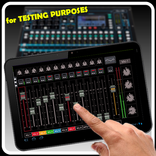
Remote control digital audio mixers with your smartphone or tablet
Mixing Station allows you to remote control digital mixers from various manufacturers in one unified UI.
The following models are supported:
- Behringer X32 / M32
- Behringer XAir / MR
- Behringer WING
- A&H dLive
- A&H Avantis
- A&H GLD
- A&H iLive
- A&H CQ
- A&H SQ / SQ+
- A&H Qu (new and legacy)
- Midas HD96
- PreSonus StudioLive3
- Soundcraft Si / Vi / Ui
- Mackie DL32S/16S DL32R DL1608
- Yamaha DM3 / DM7 / TF / CL / QL
- TASCAM Sonicview
- QSC TouchMix
- Violet Audio dMix
- Blackmagic Fairlight Live
You can fully test the app without a license!
Features:
- Fully customizable UI
- Create unlimited DCAs (IDCAs)
- Re-Gain / Clipping protection
- Customizable layers, layouts, channel strip and app theme
- RTA overlays
- Channel linking ganging
- Gain reduction history for gate and dynamics
- Peak hold for all meters, editable hold times
- MIDI support for external control
- High contrast mode for outdoor usage
- Popgroups
- Routing Matrix
- Mix copy
- Mixer independent channel presets and scenes
- FX presets
- Feedback detection for ringing out wedges
- More features available depending on the connected mixer model
- Community feature for sharing presets, themes and more with other users
Note: This app is not a DAW! It does not play any audio! It is for remote controlling only.
For more details visit the manual: https://mixingstation.app/ms-docs/feature-list/



One-click to install XAPK/APK files on Android!

Thanks for your rating and feedback!
You have already rated.