








Thanks for your rating and feedback!
You have already rated.

Weather and activity dashboard for Wear OS and Galaxy Watch
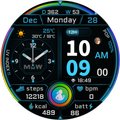
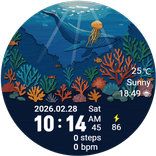
MKW Digital Dashboard 3 Watch Face | Neon Data Dashboard for Wear OS
Important Notice
This watch face is supported on Wear OS or Samsung Galaxy Watch devices running One UI 6.0 or higher.
This application is designed exclusively for smartwatches.
Users without a compatible smartwatch will not be able to use the watch face after purchase.
Watch Face Features
• Hybrid digital and analog dashboard layout
• Large digital time with seconds, 12H indicator and AM display
• Analog sub-dial with hour and minute hands
• Month, day and day-of-week display
• Day-of-year and week number display
• Month / day order option
• 18 color variants
• AOD mode with a simplified digital time display
Weather & Astronomy
• Weather icon display
• Chance of rain / POP display
• UV Index display
• Current temperature with high / low temperature
• Sunrise / sunset time display
• Moon phase icon display
Health & Activity
• Step counter
• Kcal display
• Heart rate display
• Heart rate-responsive border glow blinking
• Battery status display
Complication
• Supports 4 editable complications
• Default provider for positions 1, 2 and 3: App shortcut
• Default provider for position 4: Sunrise / Sunset
Tap Actions
• Steps
• Calendar
• Settings
• Alarm
• Heart rate
• Battery
Usage Notes
• Heart rate information is displayed based on data measured by the watch’s heart rate application.
• Weather data may vary depending on the connected provider.
• AOD mode uses a simplified layout compared with the main watch face screen.
MKW Installation Guide
The “MKW Installation Guide” app is a companion application that helps install the watch face on Wear OS devices.
MKW products include a smartphone companion app, and the “MKW Installation Guide” supports Wear OS watch face downloads only.
Community & Support
• Blog: https://excing4860.tistory.com/
• Email: excing4860@naver.com



One-click to install XAPK/APK files on Android!
Thanks for your rating and feedback!
You have already rated.