Package Name:com.digitalworkroom.noted
Show More


13.4 MB
File Size
Everyone
Android 7.0+
Android OS
Voice recorder with timestamped notes. Tap any note to hear that moment again.
Record a lecture, meeting or interview and type notes as you listen. Noted links every note to the second you wrote it, so one tap plays back exactly what was being said. No more scrubbing through an hour of audio to find the one thing you needed.
A voice recorder and note-taking app in one, made for students recording classes, teams taking meeting notes, and journalists and researchers recording interviews.
No account and no sign-up. Your recordings and notes stay on your phone unless you choose to sync them to your own Google Drive.
---
HOW IT WORKS
1. Tap record.
2. Type notes as you go. Each one is stamped with its time in the recording.
3. Later, tap any note to hear that moment again.
TIMESTAMPED NOTES
Your notes become an index to your recording. Skim the notes, tap the line you need, and you are listening to it.
#TIMETAGS
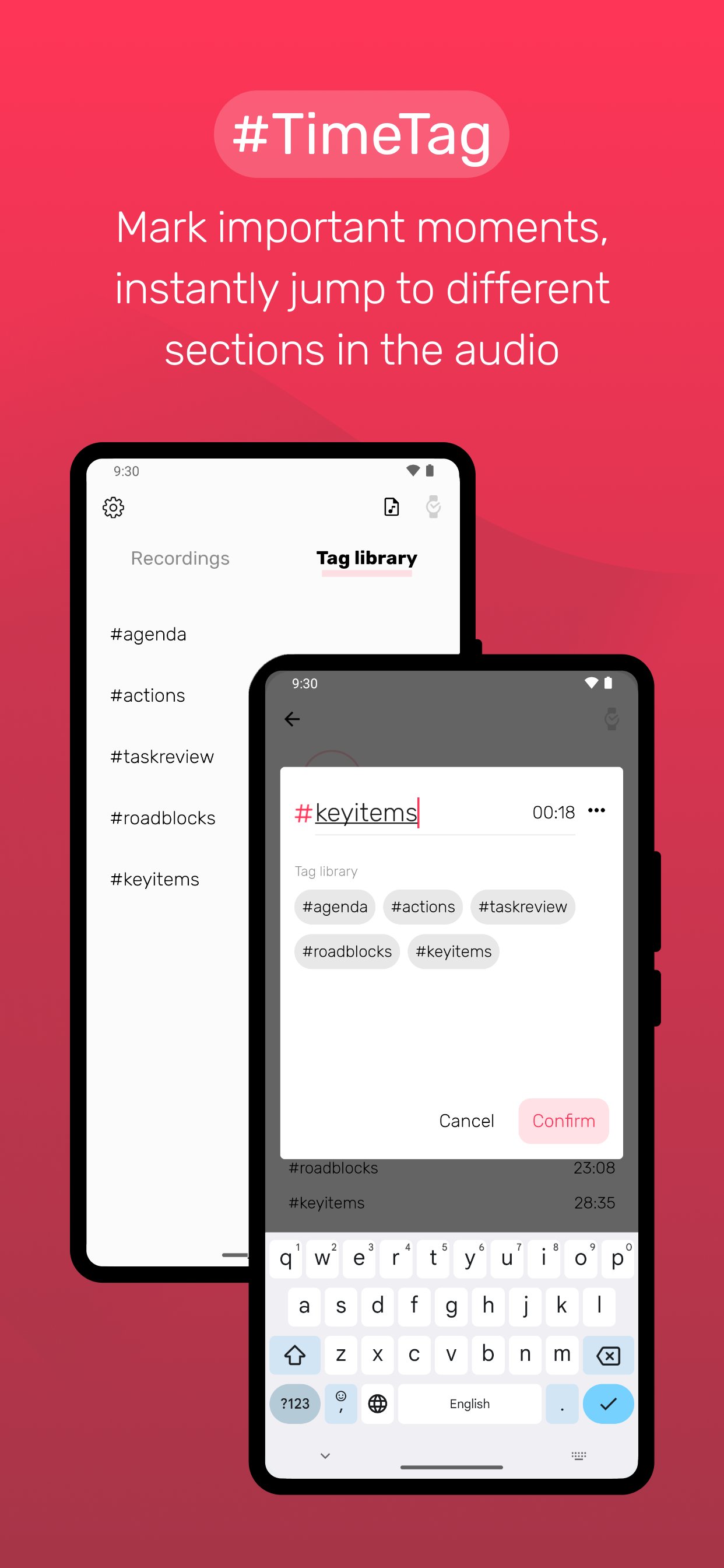
Mark key moments while you record – #exam, #action, #quote – and jump straight to them during playback.
SHARE YOUR RECORDINGS
Send any recording as an M4A audio file by email or through your favourite apps.
---
GO FURTHER WITH NOTED+ (ONE-TIME PURCHASE)
PRIVATE TRANSCRIPTION – SPEECH TO TEXT ON YOUR PHONE
Turn recordings into text, live while you record or afterwards from the saved audio. Transcription runs on your phone, so your audio never leaves it. (Needs Android 13 or later and on-device speech recognition.)
SYNC WITH GOOGLE DRIVE
Keep your notes, tags and recordings the same on all your Android devices, stored in your own Google Drive. Moving to a new phone? Turn on sync and everything comes with you.
IMPORT AUDIO
Bring in MP3, WAV and M4A files – voice memos, lecture recordings, podcasts – as new notes.
#TIMETAGS LIBRARY
Save the tags you use most and add them to long recordings in one tap.
PLAYBACK SPEED & SKIP TIME
Play back from 0.75× to 2×, and set how far the skip buttons jump, to get through a long lecture or meeting at your own pace.
SPACE THEMES
Choose from 7 space themes. Noted adapts to dark mode automatically.
XIAOMI WATCH S1
Start and stop recording from your wrist.
---
Noted+ details:
• Noted+ is a one-time purchase (Lifetime). No subscription.
• Payment is charged via Google Play and the price may vary by location.
---
Have a question or feedback? We read every message.
Email: [email protected]
Website: https://www.notedapp.io
Privacy Policy: https://www.notedapp.io/privacy-policy/





One-click to install XAPK/APK files on Android!

Thanks for your rating and feedback!
You have already rated.