
Package Name:com.pixconvert.app
Show More

41 photo, PDF, video & audio tools: compress, convert, HEIC to JPG. On-device.
PixConvert is an all-in-one photo, PDF, video and audio toolkit that runs entirely on your phone. 41 tools to compress, convert, resize and crop images, remove backgrounds, merge and split PDFs, shrink videos, cut audio and turn speech into text. Your files are processed on-device and are never uploaded to a server.
No account. No sign-up. No cloud.
WHY PIXCONVERT
• Private by design: your photos, PDFs, videos and recordings never leave your phone.
• Location removed by default: saved images never carry GPS data.
• One app instead of twenty: 41 focused tools.
• Share or open any file and PixConvert suggests the right tool.
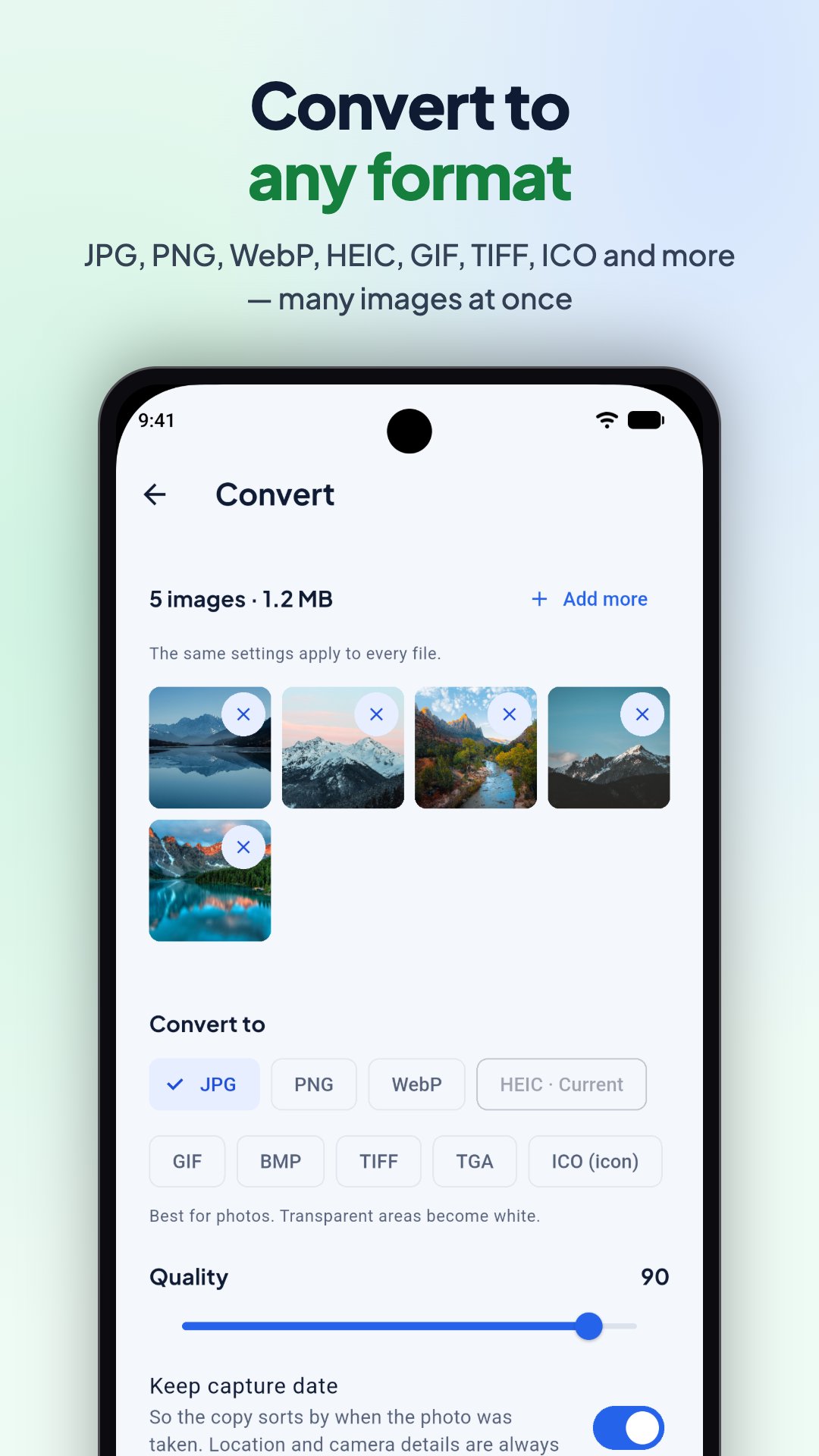
• Batch mode: compress, resize, convert or clean many photos at once.
• Long jobs keep running in the background and notify you when ready.
• Your originals stay untouched: every tool saves a new copy.
• Everything unlocked: all 41 tools, full quality, no daily limits, no watermarks.
PHOTO TOOLS
• Photo Compressor: shrink photos, or hit an exact size for WhatsApp, Discord or email.
• Image Converter: HEIC to JPG, plus PNG, WebP, GIF, TIFF, BMP, ICO and more. Opens AVIF, PSD and SVG.
• Resize Image: social presets, percent, width × height or target file size.
• Crop: aspect ratios, circle crop and straighten.
• Rotate & Flip: turn, mirror and straighten with a live preview.
• EXIF Remover: strip location and camera metadata before you share.
• Watermark: text, logo or tiled patterns.
• Collage: grids and layouts for 2 to 9 photos.
• Screenshot Stitch: join screenshots into one long image.
• Blur Area: pixelate or blur any part of a photo.
AI TOOLS, ON-DEVICE
• Background Remover: cut out the subject, add a new background or make a sticker.
• AI Upscale: enlarge photos 2× or 4×.
• Face Blur: detect and blur faces automatically.
• Passport / ID Photo: passport and visa sizes for many countries, plus a print sheet.
• Speech to Text: transcribe audio and video, export as text, SRT or VTT subtitles.
PDF TOOLS
• PDF Merge, Split and Organize: combine files, split by pages, reorder, rotate or delete pages.
• PDF Compress: shrink scanned and image-heavy PDFs, even to a target size.
• Image to PDF and Scan to PDF: turn photos or paper documents into a PDF, auto-cropped.
• PDF to Images: save pages as JPG or PNG.
• Unlock PDF: remove a password you know.
VIDEO TOOLS
• Video Compressor: make videos small enough to send.
• Video Trimmer: cut the start and end, with lossless fast trim.
• Video Converter: MP4, MOV, MKV and WebM.
• Mute, Rotate and Speed: remove sound, turn or mirror, slow motion to 4× fast.
• Video to GIF, Photos to GIF and GIF to Video.
• Video to Photo: save any frame as a photo.
AUDIO TOOLS
• Video to Audio: extract the sound as MP3, M4A, WAV or FLAC.
• Audio Converter: MP3, M4A, WAV, FLAC, OGG and Opus.
• Audio Cutter: trim, fade and make ringtones.
• Text to Audio and Image to Audio: read text, or the text in a photo, aloud and save it.
UTILITIES
• QR Code Generator: links, text, Wi-Fi and contacts.
• QR & Barcode Scanner: use the camera or a screenshot, with safe-link checks.
• Image to Text (OCR): copy text from photos in many languages, right from the camera.
HOW IT WORKS
1. Pick a tool, or share a file into PixConvert.
2. Adjust the settings and preview the result.
3. Save it to your gallery or share it.
WORKS OFFLINE
Your files are processed without an internet connection. A few features download what they need once: Background Remover and Scan to PDF get their on-device model from Google Play services, and Speech to Text downloads the speech model you choose. Text to Audio uses offline voices unless you turn on online voices in Settings.
PRIVACY
PixConvert has no accounts and never uploads your photos, PDFs, videos or audio. To fix bugs and improve the app, we collect crash reports and app usage statistics through Google Firebase. That never includes your files or what's in them. Privacy policy: https://www.pixconvert.com/app-privacy
Also on the web at www.pixconvert.com.





One-click to install XAPK/APK files on Android!

Thanks for your rating and feedback!
You have already rated.