Package Name:com.simonj.posereference
Show More


51.9 MB
File Size
Everyone
Android 7.0+
Android OS
3D pose reference for drawing: 30 poses, drag to pose, light it, export a PNG
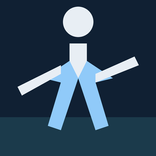
3D pose reference for drawing. Start from one of 30 ready poses, drag a hand or foot and the arm or leg follows, then fine-tune any joint by the degree. Light the wooden mannequin, pick one of seven camera views and export a PNG with a transparent or plain background to draw from. Undo goes back one step at a time and never clears the scene.
▶ UNDO THAT NEVER RESETS THE SCENE
• Every pose edit is one Undo step: dragging a limb, a dial scrub, a ±1° tap, a starter pose, Mirror or Reset. Up to 200 steps.
• Redo stays available until you make a new change.
• Reset pose asks first, keeps the body proportions and can itself be undone.
• The top bar shows how many Undo and Redo steps you have.
• Your working pose is saved as a draft about 2 seconds after you stop (at most 5 seconds while you keep dragging) and when you leave the app, so the last saved draft opens again next time.
▶ EVERY JOINT BY THE DEGREE
• Tap a joint on the figure or pick it from the joint list: 17 joints from head to feet.
• Each joint has Bend, Side and Twist dials with the angle in degrees. Drag a dial, tap −5, −1, +1 or +5, or type an exact value.
• Joint limits are on by default so poses stay natural. Switch Limits off for exaggerated poses.
• Drag a hand or foot and the arm or leg follows your finger. If it cannot get there, it stops short and a note says why: out of reach, or a joint limit (switch Limits off for exaggerated poses). Long-press a hand or foot to pin it in place while you pose the rest.
• Hands have a finger-curl control, and the hips can be raised or lowered.
▶ CAMERA, LENS AND LIGHT
• Seven camera views: front, 3/4, side, back, eye level, worm's eye and bird's eye. Orbit with one finger, zoom and pan with two.
• Lenses of 24, 35, 50, 85 and 135 mm: the figure keeps its size while the perspective changes, with the vertical view angle shown.
• Move the light around the figure and up or down, with a floor shadow you can switch off.
• Mirror swaps the left and right side of the pose in one step.
▶ BODY TYPES AND STARTER POSES
• Five body types: Standard, Heroic, Slender, Broad hips and Youth.
• Set the height from 6 to 9 heads, the shoulder width, hip joint spacing, arm length and leg length. A value outside the range is shown as a conflict, not silently changed.
• 30 starter poses to begin from, such as walking, running, crouching, kneeling, sitting, throwing and a boxing guard.
• The “30 poses” button at the start of the toolbar opens them in one tap.
• Save poses to your library with a thumbnail, rename them, and undo a delete right away.
• Back up the library to a file and restore it later.
▶ EXPORT A PNG
• Aspects 1:1, 4:5, 3:4, 9:16 and 16:9 in Standard or Large size. Large is 2000 × 2000 px at 1:1.
• Transparent, white, grey or colour background, with or without the floor grid.
• The file is read back and checked against the size you chose before it is shown as ready. Then share it to the app you draw in.
▶ GOOD TO KNOW
• Hands are mittens with one finger-curl control; there are no separate fingers. The mannequin has no face, hair or clothes.
• Joint limits are approximate.
• If the app is closed suddenly, the very last movement before the close may be missing from the draft.
• Poses are stored in the app on this device. Images and backup files leave the app when you choose to share them.
• Ads appear on the pose library list, and sometimes after you finish an export or when you return to the app. There is no banner on the posing screen.



One-click to install XAPK/APK files on Android!

Thanks for your rating and feedback!
You have already rated.