








Thanks for your rating and feedback!
You have already rated.

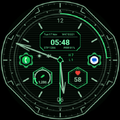
A cyberpunk HUD dial: analog hands, a live 24-hour ring, honest gauges.
Quadrant is a head-up display for the wrist. An octagonal frame with chamfered corners, a scanline ground, real analog hands over a lit readout block, and four hexagonal wells cut into the dial.
The two complications adapt to what you put in them
Most dials give you a fixed circle and hope your reading fits it. Quadrant reads the provider first. Assign something with a range and the well sweeps a needle against that provider's minimum and maximum, prints the scale, and puts the provider's icon in the middle of the gauge. Assign plain text and the needle and the scale go away, so the reading gets the whole hexagon at a size chosen to fit it. Assign an icon and you get the icon. The printed scale is only ever there when a range is behind it, and the hands stay where they are whatever you choose.
Out of the box the left well gauges your step count against your own daily goal, and the right well reads your heart rate with the provider's heart beside it. Heart rate comes as a number rather than a gauge, because Wear OS publishes it as text and not as a range. Install a provider that does publish a ranged heart rate and the well gauges it.
Two app shortcuts, and you pick the apps
The two small hexagons on the nine and three axis are app-shortcut slots. They take an icon only, so nothing can spill out of them, and they arrive unassigned: press and hold the dial, open Customize, and choose the two apps you want a thumb away from the time. Until you do, your watch draws its own plus sign in them.
Weather, and the one permission it needs
Wear OS does not grant watch faces location access by default. Allow it once and the register above the wells carries the temperature, a condition glyph the face works out for itself, and today's high and low: Settings > Security and privacy > Permission manager > Location > Watch faces > Allow while using the app. Until you do, that space carries the QUADRANT wordmark instead - no dashes and no empty box. Everything else - time, date, steps, heart rate, charge, the 24-hour ring and both complications - works the moment you install it.
The readout block
Across the upper half: the date with the month, the week number and the day of the year, the hour in 12- or 24-hour whatever your phone is set to, and a footer that keeps your step count and your battery charge live. That footer is fixed, so neither reading can be lost by reassigning a complication. Three finishes: a dark plate, a lit plate, or no plate at all.
A live 24-hour ring
Midnight at the top, one turn per day, hour blocks all the way round, and an arc with a cursor at its head that tracks the day as it passes. A glance says how much of the day is behind you. Nothing on that ring is a scale that reads nothing.
Always-on
Four densities, and you choose. Two hands and the twelve; the time as well; the time, date, charge and steps; or the full rim and index too. Measured between 0.9 and 2.8 per cent of the screen lit.
Make it yours
Thirty colour themes, four hand shapes, four index styles, three readout finishes, four always-on densities and a 12- or 24-hour clock. Forty-seven choices across six axes, 11,520 ways to set it up, every one of them made on the watch itself. There is no phone app to install.
The face's own labels are in English.
If you have a question, or something is not working right, please write to us at [email protected].



One-click to install XAPK/APK files on Android!
Thanks for your rating and feedback!
You have already rated.




