Scan Date:Apr 6, 2026
Show More

8.4 MB
File Size
Everyone
Android 6.0+
Android OS
Remote mouse, keyboard & trackpad for PC and Mac over local Wi-Fi.
Turn your Android phone into a remote mouse, keyboard and trackpad for your Windows PC or Mac.
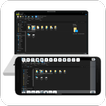
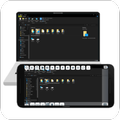
ScreenPad lets you control your nearby computer from your phone over local Wi-Fi or USB tethering. Move the cursor, type with your phone keyboard, use touch gestures, access shortcuts, view your computer screen and transfer files — without sitting in front of your computer.
Perfect for controlling your computer from the sofa, bed, across the room or during a presentation.
REMOTE MOUSE & TRACKPAD
• Move and control your computer cursor from your phone
• Tap, click, scroll, drag and zoom with touch gestures
• Use your Android device like a wireless PC trackpad
• Control your computer comfortably from anywhere in the room
REMOTE KEYBOARD
• Type on your PC or Mac using your phone
• Access useful keyboard shortcuts
• Quickly copy, paste and perform common actions
• Control your computer without reaching for the physical keyboard
PC & MAC CONTROLS
• Adjust volume and brightness
• Sleep, restart or shut down your computer
• Take screenshots
• Access useful computer shortcuts from your phone
SCREEN VIEW & FILE TRANSFER
ScreenPad includes more than mouse and keyboard control.
• View and mirror your computer screen on your phone
• Transfer files between your phone and computer
• Keep common computer controls within easy reach
SIMPLE LOCAL CONNECTION
Getting started takes just a few steps:
Install the ScreenPad desktop companion on your Windows PC or Mac
Connect your phone and computer to the same local Wi-Fi network, or use USB tethering
Open ScreenPad on both devices
Select your computer and start controlling it
BUILT FOR NEARBY COMPUTER CONTROL
ScreenPad is designed for fast local control of computers on your network.
Use it for:
• Watching movies or videos from the sofa
• Browsing your computer from bed
• Controlling presentations
• Typing when you're away from your keyboard
• Using your phone as a backup wireless mouse
• Quickly accessing PC controls and shortcuts
ScreenPad is a local-network PC remote. It is not an internet remote-access or remote-support service.
REQUIREMENTS
• Android phone or tablet
• ScreenPad desktop companion
• Windows PC or Mac
• Both devices connected through the same local network or USB tethering
ScreenPad contains ads and offers an optional in-app purchase to remove ads.
Desktop companion:
https://screenpad.app
Privacy policy:
https://screenpad.app/privacy
Support:



One-click to install XAPK/APK files on Android!

Thanks for your rating and feedback!
You have already rated.