Scan Date:May 17, 2026
Show More


5.5 MB
File Size
Everyone
Android 5.0+
Android OS
Analog clock with classic deals
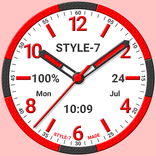
This analog clock has many options for appearance. There are three kinds of dials and hands, seven color themes. You can also use Arabic or Roman numbers and set custom title for the dial.
Use the analog clock as topmost or overlay clock. The clock will be set under all windows. You can change position of the clock by drag and drop method and size of the clock.
Use the analog clock as Live Wallpaper: set the clock size and position on the Home screen.
Use the analog clock as an app widget: clock shows the second hand for Android 12 or high.
Use the analog clock as app in full screen mode with "keep screen on" option.
Use the analog clock as screensaver while a device is charging.
🕒 Use analog clocks as “Night Clock” — a calm mode with economy style (black background and dark‑gray hands) that saves battery.
Random position change every minute protects the screen from burn‑in.
All options work in Fullscreen mode, Live Wallpaper, and Screensaver.
🌙 Use analog clocks as “Always on Screen” — the clock remains visible even when the screen is turned off. ⚠ Important: the function does not start automatically, you need to launch it manually in Fullscreen mode.
“Always on Display” emulation works through additional options: 🔆 brightness control and Auto‑lock on exit.
Analog clock can tell you the current time by voice by double tap on the app window or Live Wallpaper and periodically, for example by 60 minutes.
Select an image from the Gallery and color for the background.
So this app is: classic analog clock, analog clock Live Wallpaper, analog clock widget, clock widget with second hand, talking clock, classic clock.



One-click to install XAPK/APK files on Android!

Thanks for your rating and feedback!
You have already rated.