Scan Date:Nov 18, 2026
Show More


10.7 MB
File Size
Everyone
Android 7.0+
Android OS
A lock screen whose PIN is the current time, so it changes every minute.
Time Password is a lock screen where your passcode is the current time. At 4:55 your code is 0455, and a minute later it is 0456. There is nothing to memorise, and anyone who watches you unlock sees a code that stops working within a minute.
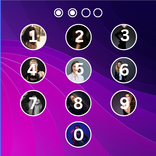
Version 4 is a complete redesign with a frosted glass keypad, a big glass clock and smooth, spring-based motion.
HOW THE TIME PASSWORD WORKS
Choose how your code is built:
• Current Time: the time is your code (4:55 becomes 0455)
• PIN + Current Time: your 2-digit PIN, then the time (12 and 4:55 become 120455)
• PIN + Hour: your PIN, then the hour
• PIN + Minute: your PIN, then the minute
• PIN + Day: your PIN, then today's date
• PIN Only: a fixed 4-digit PIN
Turn on Reverse to type the code backwards. 12-hour and 24-hour clocks are both supported, and the Security Type screen always shows what your code is right now.
A LOCK SCREEN THAT LOOKS GREAT
• Frosted glass keypad with a soft glow on every press
• Big clock in glass or solid style, three weights and any colour
• Built-in HD and gradient wallpapers, or a photo from your gallery or camera
• Keypad themes: glass, water drops, stars, hearts, photo keys and more
• Torch button right on the lock screen
• Battery, Wi-Fi and signal at the top
USEFUL WHILE LOCKED
• Notifications under the clock (optional). Message previews stay hidden unless you turn them on.
• The lock steps aside for incoming calls and alarms.
PROTECTION
• Fingerprint or face unlock on supported phones, with the time code always available as a backup
• Intruder Selfie: the front camera takes a photo after a set number of wrong attempts
• Forgot your code? Answer your recovery question to unlock. Your answer is stored as a secure hash.
• Your passcode, PIN, recovery answer and intruder photos stay on your phone
PERMISSIONS
• Display over other apps: needed to show the lock screen
• Camera: only used if you turn on Intruder Selfie
• Notification access: only used if you turn on lock screen notifications
• Phone: so the lock can step aside during calls
• Notifications: for the small ongoing notification that keeps the lock running
TIPS
On phones with aggressive battery savers, allow Autostart and turn off battery optimisation for Time Password so the lock keeps working after a restart. The app shows you where to find these settings.
Time Password is free and supported by ads.



One-click to install XAPK/APK files on Android!

Thanks for your rating and feedback!
You have already rated.