Package Name:com.lockilee.lockilee
Show More

25.5 MB
File Size
Everyone
Android 7.0+
Android OS
Lock your apps, photos, videos and files with one secure private vault.
# Lockilee – Private Vault & App Lock
**Lock your apps, photos, videos and files with one secure privacy app.**
Lockilee combines a private encrypted file vault with App Lock to help protect the personal content and apps on your Android device.
Your private vault files remain on your device. Lockilee does not store your photos, videos, documents or other private files on Lockilee servers.
## 🔐 App Lock
Lock selected apps on your Android device with Lockilee.
You can protect apps such as messaging, gallery, email, social media and other apps with Lockilee's PIN, password or biometric authentication.
App Lock includes:
* Lock individual apps
* Lock multiple apps
* PIN/password protection
* Fingerprint and biometric unlock
* Automatic re-lock
* Configurable lock timing
* Failed unlock tracking
* Optional intruder detection
### Accessibility Service for App Lock
Lockilee uses the **Android AccessibilityService API** solely to provide its App Lock functionality.
When App Lock is enabled, the Accessibility Service allows Lockilee to detect when a user-selected protected app is opened so Lockilee can display its security lock screen before the protected app can be accessed.
The service is used only for this user-requested App Lock functionality.
Lockilee does not use the Accessibility Service to read, collect, store or share the contents of your screen, messages, emails, photos, videos, documents or other personal content.
The Accessibility Service is not enabled unless you choose to enable App Lock and grant the required Android permission.
You can disable the Accessibility Service at any time from Android settings.
## 🔒 Private File Vault
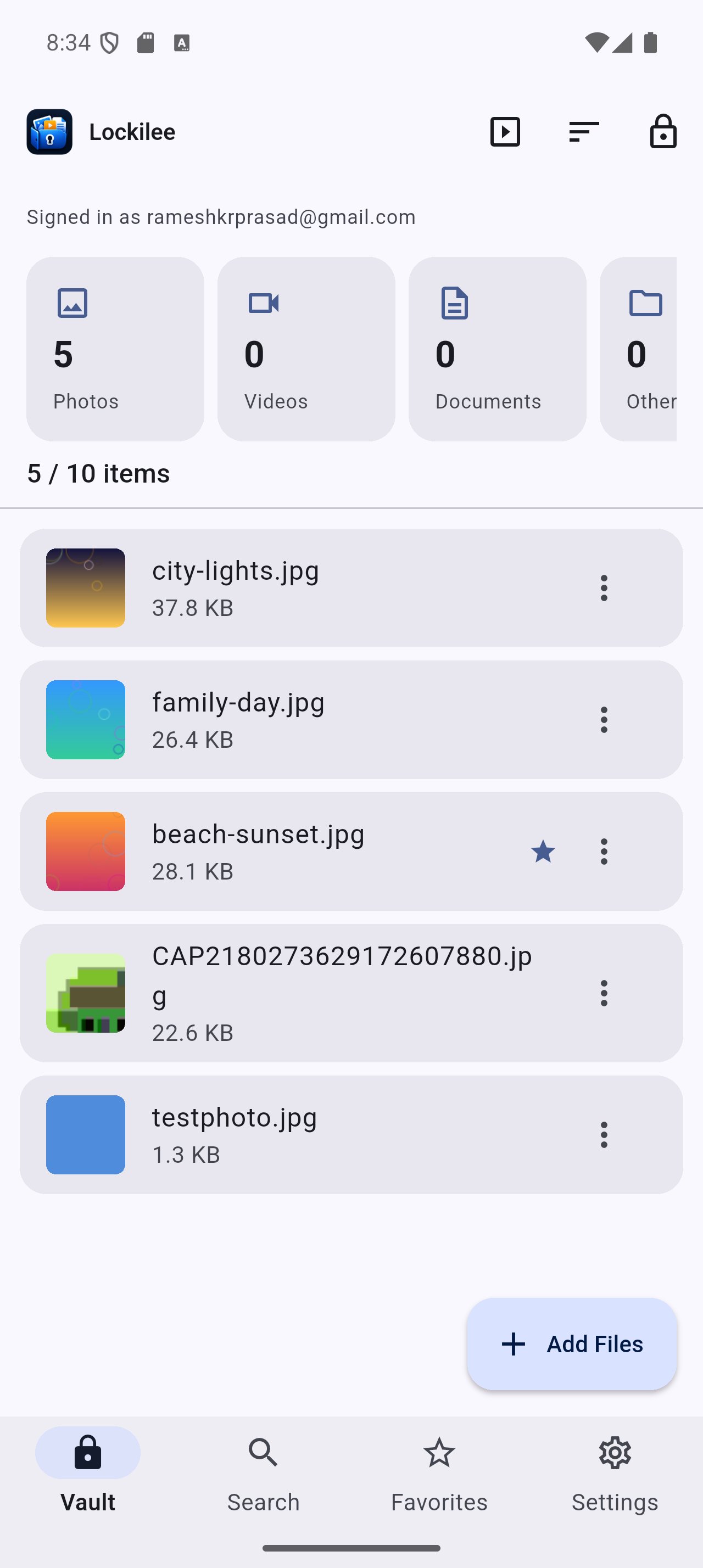
Protect your personal files inside Lockilee's encrypted vault.
You can secure:
* Photos
* Videos
* Documents
* PDFs
* Audio files
* GIFs
* ZIP files
* APK files
* Other supported files
Files are encrypted and stored locally on your device.
**Lockilee does not store your private files on its servers.**
## 📁 Import Entire Folders
Import an entire folder instead of selecting files individually.
Lockilee preserves:
* Folder structure
* Subfolders
* File names
* File types
You can import complete collections of photos, documents, videos and other files while keeping their original organization.
## 🔐 Custom Folder Lock
Protect individual folders inside Lockilee with an additional custom PIN or password.
For example:
Photos
Documents 🔒
Personal 🔒
Travel
Work
Each protected folder can have its own security layer.
## 📷 Private Photo Vault
View your private photos with a clean, full-screen experience.
Features include:
* Full-screen viewing
* Borderless photos
* Swipe navigation
* Pinch-to-zoom
* Double-tap zoom
* Auto rotate
* Full-screen slideshow
* Shuffle
* Repeat
## 📷 Private Camera
Capture photos and videos directly into your Lockilee vault.
Private Camera content is encrypted and stored inside Lockilee instead of automatically appearing in your regular gallery.
## 🧮 Calculator Disguise
Lockilee can optionally appear as a normal calculator.
The calculator works normally while a secret unlock sequence can open your private vault.
## 🕵️ Intruder Detection
Enable optional intruder detection to monitor failed vault or app unlock attempts.
Where supported and permitted, Lockilee can capture an image after failed attempts and securely store the security event inside your vault.
## 🔐 Privacy by Design
Lockilee is built around a simple principle:
**Your files. Your device. Your control.**
Your private vault files remain on your device unless you explicitly choose to sync encrypted copies to your own Google Drive.
Lockilee does not store your private photos, videos, documents or other vault files on its servers.

One-click to install XAPK/APK files on Android!

Thanks for your rating and feedback!
You have already rated.