Safe & Fast APK Downloads on APKPure
APKPure uses signature verification to ensure virus-free ReVanced Manager APK downloads for you.


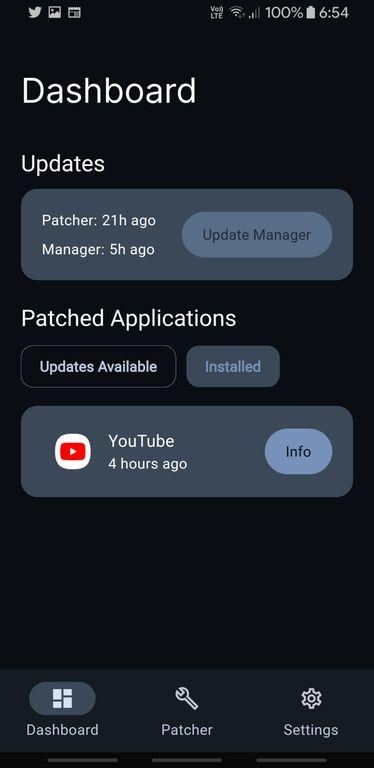
ReVanced Manager is an on-device patching tool for Android apps.
Built by ReVancedTeam, it streamlines patching so you can tailor supported apps without a computer. For users seeking features like background playback or SponsorBlock, download ReVanced Manager to create a setup that fits real daily use. Below are the key features that define its experience.
Patch supported apps directly on your phone, no computer required.
Toggle modular patches like background playback, SponsorBlock, Return YouTube Dislike.
Guided workflow fetches components, builds, and installs in one place.
Patches aim to keep working across app updates with community maintenance.
DIY model: learn and control your build, no pre-patched APKs provided.
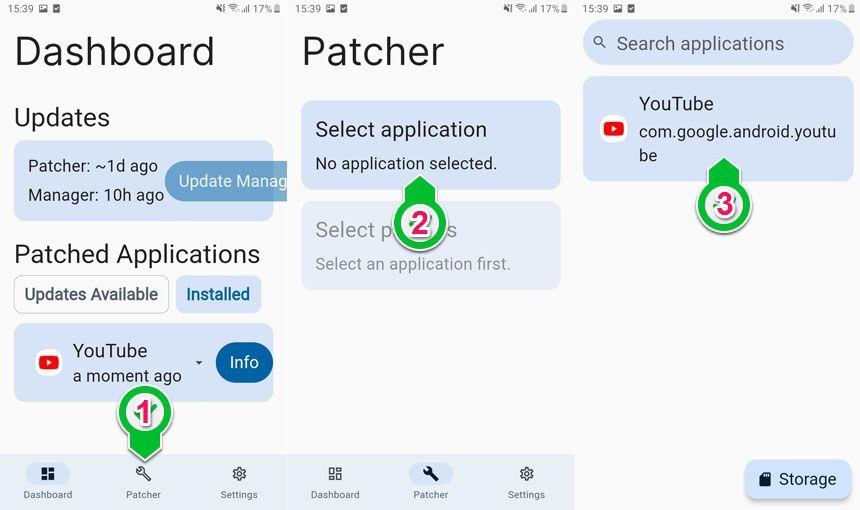
On-device patching means you pick a compatible APK from local storage and build a patched version right on your phone. ReVanced Manager surfaces installed apps and a “Select from storage” option to start, so the flow fits how users actually manage files on Android. Choosing a target from your device keeps the process quick, and it removes the need for a PC or command-line tools.
There is a learning curve around finding compatible APKs and matching them with supported patch sets. When unsure, check the project’s official resources to confirm which app versions work best and what dependencies are needed. Users who prefer a low-effort setup can start with a single app and a small set of patches, then expand once the basics feel comfortable.
The patch selection screen presents individual modules with toggles so you only enable the features you want. Within ReVanced Manager, the patch selection screen uses simple controls for popular options such as background playback, ad control tweaks, SponsorBlock, and Return YouTube Dislike for YouTube ReVanced. This modular approach keeps your build lean and focused on daily needs.
Not every patch applies to every app or version, and over-enabling features can introduce conflicts. A practical tactic is to enable core modules first, test the app, then add extras one by one. If a specific module misbehaves after an app update, disable it temporarily and watch for patch updates from the community.
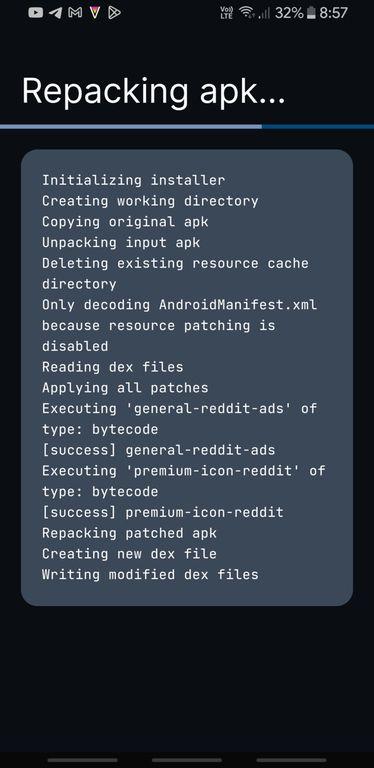
The manager guides you through fetching required components, building the patched APK, and prompting installation when the build finishes. During the build, ReVanced Manager fetches necessary components automatically, reducing manual steps and making the process feel cohesive. The install prompt appears at the end, so you move smoothly from configuration to a working app.
Some setups may ask for additional components like GMSCore depending on the target app’s requirements. If prompted, install those pieces and then return to the workflow. Installation steps differ by device and Android version, so allow the standard permissions prompts and give the builder enough storage space to complete the job.
Patches are designed with durability in mind, aiming to keep working across app updates with minimal maintenance. The project is open-source, with an official site, GitHub releases, and active social channels that share guidance, fix notes, and compatibility lists. The ethos behind ReVanced Manager favors stability and transparency, so users can track changes and make informed choices.
Because no pre-patched APKs are distributed, you patch your own apps and own the process. If something breaks after an update, roll back to a compatible version or wait for patch refreshes from the maintainers. This DIY model rewards users who value control and prefer to tailor features to everyday habits rather than accept a one-size-fits-all build.
Thanks to on-device patching and a modular workflow, ReVanced Manager gives users flexible control while expecting informed choices about APK sourcing and features.
Pros
On-device patching without a PC.
Clear, guided workflow from patch to install.
Flexible modules like SponsorBlock and ad controls.
Open-source project with active community help.
Patches focus on long-term compatibility.
Cons
Requires sourcing compatible APKs yourself.
Compatibility varies by app and version.
Some setups need extra components like GMSCore.
You can download ReVanced Manager latest version APK from APKPure and install it like any standard Android app. The APK is lightweight, typically around 40–50MB, so downloads finish quickly on stable home Wi‑Fi. After installation, the first launch may request permissions needed to read storage and build patched apps.
If storage space is tight, free up room before starting a build; patching and compiling temporarily use additional space beyond the APK itself. Once set up, choose your target app, review modules, and begin the guided workflow. For any compatibility questions during patching, check the project’s official resources or community channels for current guidance.




One-click to install XAPK/APK files on Android!

Thanks for your rating and feedback!
You have already rated.