Package Name:com.phdsoftware.andtheclock
Show More


882.4 KB
File Size
Everyone
Android 5.0+
Android OS
Studio clock with RSS feed as live wallpaper
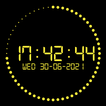
AndTheClock is a simple live wallpaper app, which can be easily adapted to your own requirements and personal taste. It shows the actual time in a digital presentation and shows the running seconds in a circle around it. It displays the time as what we call a studio clock.
Hint: If you have any problems with setting the wallpaper, use a special wallpaper picking app, such as Google Wallpaper.
The current day and date can be optionally displayed. The date format can be adjusted to your local convention. You can choose from a variety of fonts in the app, or try the 'surprise' font that randomly applies one of the embedded fonts every minute. You can also use a local font (downloaded somewhere).
To use your own font, download the font of your choice, select the font file via the 'Select font file' option. Also select the [file font] item from the list of available fonts via the 'Fonts' option.
Different colors as default are used every 6 hours. You can select different color sets and make your own custom set. The background color can also be changed optionally combined with one of the available transparent textures.
You can also use your own background image, which you can select from your gallery (should be less than 6 Mb). If desired, you can change the text font and scale down a little (to a minimum of 40%).
An optional banner can show your battery level and the temperature of your device. It uses colors to highlight different levels. You can also count and show your daily 'lookapps' to control your phonephilia. The number of times you activate your device is counted daily and displayed along with the average of the past seven days. The counter can also be expressed as a percentage of this average. Remember, it just for fun and no one should it (except you).
An optional RSS feed can show you feeds as a ticker line at the banner position. You should therefore enter the full web address of the desired feed. You can adjust the frequency, recurrence times and max. number of items of the feed line. You can store 3 addresses so that you can easily switch if you wish. If the RSS feed is enabled, it will show every time your screen is unlocked and optionally every 2, 5, 10 or 15 minutes.
The latest feature provides you a simple timer. Press the center of the clock and the timer starts running (if enabled), from some minutes to 0:00 or vice versa.
Remember that after downloading the AndTheClock-app, you have to install the app as a live wallpaper via long-pressing on an empty space of your home screen. You cannot find the AndTheClock-app in your regular app directory as it will be downloaded in an Android system directory reserved for live wallpapers.
That's pretty much it.
One more thing..
Since version 1.8d you can display your clock background in two colors, for example using the colors of the Ukraine flag:
- Enable in "Settings via Date & Options" the option "Show clock circle"
- Set via "Color set & more" / "Custom colors" / "Custom colors by hex value" the "Clock circle color" in FFD700 and the "Clock circle (upper-)color" into 0057B7



One-click to install XAPK/APK files on Android!

Thanks for your rating and feedback!
You have already rated.