









Thanks for your rating and feedback!
You have already rated.

Widgify is an Android customization app for widgets, themes, and live wallpapers.
Widgify Group builds the app around quick home screen makeovers, with ready-made styles that help users change the look of their phone without starting from a blank layout. For anyone planning to download Widgify, these are the main areas worth checking first.
One-click themes are the fastest way to change the overall style of a phone screen. Widgify groups matching visuals into complete looks, so users can apply a coordinated setup instead of adjusting every part separately. The catalog includes cute cartoon designs, real-scene styles, colorful layouts, and trend-focused themes that suit different moods.
The preview system helps users judge a theme before applying it. This is useful when trying a soft pastel layout for daily use, a brighter setup for a weekend look, or a cleaner visual style that keeps icons and widgets easier to read. Some of the more attractive themes may sit behind VIP or Premium access, so checking the visible labels before choosing a layout can save time.
DIY live wallpapers give the home screen a more personal feeling through moving or styled visual templates. Widgify includes options such as film-roll, couple, and vision board designs, which are suited to users who want a screen that feels closer to a photo wall or mood board than a standard static background.
The templates are designed for quick customization rather than complex editing. A film-roll style can work well for travel photos, while a couple template may suit shared memories or matching screen ideas. Vision board layouts are helpful for placing goal images where they are seen often during the day. Advanced effects may need extra setup on some Android devices, especially when system wallpaper permissions or battery settings affect live visuals.
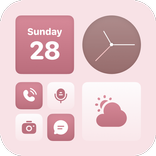
The widget library is one of the main reasons to try the app. Widgify offers practical widgets such as clock, calendar, and to-do tools, alongside more decorative options like photo, page-flip, audio, and private friend photo-sharing widgets. This mix lets users build a screen that is both useful and expressive.
A daily layout might combine a clock widget at the top, a calendar for upcoming plans, and a photo widget for personal images. Users who like more playful screens can explore page-flip or audio widgets for a livelier feel. The latest update also adds Bubble Pop, AC, and Fridge widgets, giving the catalog more casual and novelty-style choices. The main limitation is discovery, as some users may miss a search bar when looking specifically for free widgets.
Widget editing adds more control after a user chooses a basic widget type. Widgify allows changes to backgrounds, images, fonts, and colors, which helps each widget match the rest of the home screen instead of looking like a separate element. This matters most when mixing tools from different categories.
For example, a to-do widget can be softened with a light background, while a photo widget can use colors that match the wallpaper behind it. Font changes also help with readability, especially on busy wallpapers or darker layouts. The editing options are simple enough for casual use, but users who want every widget to look perfectly aligned may need to spend a little time testing color and image combinations.
Regular updates keep the app from feeling static. Widgify refreshes its theme and wallpaper library over time, and the 5 Jun 2026 update added Bubble Pop, AC, and Fridge widgets. These additions are useful for users who like changing their home screen often rather than keeping one layout for months.
Fresh content also gives returning users a reason to check the catalog again. A phone layout can be changed for a season, a birthday week, a new study plan, or a different visual mood. However, in-app purchases and reported payment concerns mean users should review Premium prompts carefully before subscribing or unlocking paid items.
These points come from the app’s customization features, update pattern, and common user concerns. Widgify works best for users who enjoy cute layouts and flexible widgets, but paid access affects some choices.
ProsUsers can download the Widgify latest version from APKPure to try the newest widgets, wallpapers, and theme updates. The Widgify APK is around 120MB, so the download should be manageable on most Wi-Fi connections and may take longer on slower mobile networks.
After installation, the app may ask for wallpaper or home screen related permissions when applying live wallpapers and widgets. It is best to preview a few designs first, then start with one theme or one widget before building a full layout. Keeping enough storage free also helps future updates install smoothly.



One-click to install XAPK/APK files on Android!
Thanks for your rating and feedback!
You have already rated.