Package Name:com.theme.portrait.iconpack
Show More

Portrait Icon Pack contains beautiful collection of vertical icons & wallpapers
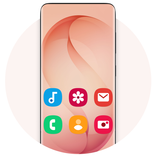
Give your Android home screen a fresh look with the Portrait Icon Pack, a collection of premium vertical cover style icons and FHD+ wallpapers. Its 900+ tall, portrait-shaped icons stand out from the usual square and round icons and bring a fresh user experience to your phone and tablet.
You check your phone hundreds of times a day, and the home screen is the first thing you see. A good icon pack and wallpaper can lift your mood and express your personality. The wallpapers in this launcher theme give a unique, attractive look to edge-to-edge displays like Galaxy S26, Galaxy S26 Ultra, Galaxy S25 Ultra & Galaxy S25.
🚀 Key Features:
• 900+ Portrait Style Icons: A vertical icon pack of clean, beautiful icons on tall, colorful rounded backgrounds, made for portrait style icon lovers.
• Calendar Date Icons: 31 calendar icons, so supported launchers can show today's date on the calendar app.
• Wallpapers in FHD+: A collection of crisp, high resolution backgrounds, free to use, that look sharp on every screen size.
• Home & Lock Screen Wallpapers: Set your favorite wallpaper as your home screen or lock screen background in one tap.
• Light & Dark Themes: The app follows your device's light or dark mode, so it looks right by day and by night.
• Offline Access & Storage: Save your favorite HD wallpapers directly to your device for quick, data-free access anytime.
• One-Tap Sharing: Seamlessly share your favorite wallpapers and the app with friends.
• Icon Requests: Missing an app? Request its icon from inside the app with an optional paid plan: one payment for the period you choose, with no automatic renewal.
• Wide Compatibility: Works on Android phones and tablets running Android 7.0 and above.
🛠️ Supported Launchers:
This portrait icon pack is fully compatible with a wide range of popular Android launchers, including:
• Desktop Launcher
• OS Launcher 27
• Galaxy S26 Ultra Launcher
• Android 17 Style Launcher
• Nova Launcher
• ADW Launcher
• Action Launcher
• Smart Launcher
• Go Launcher
💡Note: This icon pack also works with many other launchers that support third-party themes. If your launcher isn't listed, simply apply Portrait Icon Pack through your launcher's internal "Icon" or "Theme" settings.
✨ Quick & Effortless Setup:
1. Open Portrait Icon Pack.
2. Tap Apply Icon Pack and choose your launcher.
3. Enjoy your new portrait style home screen.
✨ Looking for a portrait theme, a vertical icon pack, tall rectangle icons, or a fresh launcher theme for Android? The Portrait Icon Pack brings it all together to customize your home screen.
Download the Portrait Icon Pack today and enjoy portrait style icons on your phone's launcher!



One-click to install XAPK/APK files on Android!

Thanks for your rating and feedback!
You have already rated.