Safe & Fast APK Downloads on APKPure
APKPure uses signature verification to ensure virus-free Schedule Planner Classic APK downloads for you.


12.0 MB
File Size
Everyone
Android 2.3.2+
Android OS
Become more productive with Schedule Planner Classic!
PRACTICAL AND SIMPLE TASK PLANNING
Creating new tasks is always simple to do, requiring only a few sequential steps to complete. Schedule Planner allows users to edit and change their individual tasks or by batch editing multiple tasks. Users can even create notes attached to each task if they need more details. Use our PLANNED vs ACTUAL task tracking functions to commit a task as being accomplish to chart your schedule accurately. See these results on the statistics screen.
CATEGORIES AND STATISTICS
Busy users are provided with a flexible set of categories like “Meals”, “Health”, and “Work”. Tasks are then color coordinated by category for convenience and to monitor their statistics. The app employs in-depth pie-chart and bar graph diagrams to let users see how they spend their time based on category with a quick glance.
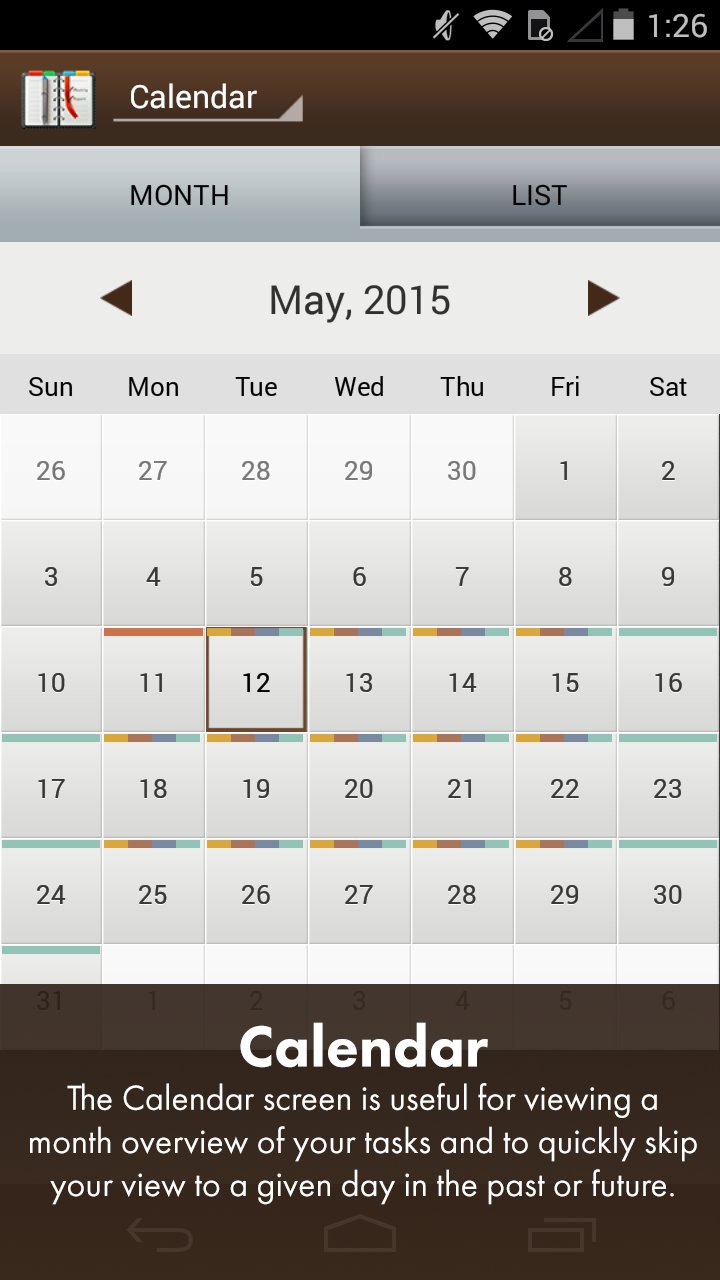
CALENDAR VIEW
Tasks and full days can be planned in advance & viewed day-by-day via a practical graphic calendar or list view. See category colors mark each day on your calendar with planned tasks.
EXPORT & BACKUP
Keep track of your schedule by exporting your schedule via CSV or PDF along with notes. Also backup your data to the cloud to keep it safe and secure and to restore your data between devices.
SYNC OPTIONS
Sync your task lists with Google Calendar.
ADVANCED SETTINGS
Custom Categories to define your own breakdowns.
Advanced Alerts and Notifications
The world is busier than ever; take this opportunity to start optimizing your time and become more productive with Schedule Planner Classic!
________________
Schedule Planner Classic is developed by Digi117, Ltd.





One-click to install XAPK/APK files on Android!

Thanks for your rating and feedback!
You have already rated.